
Nexus Updates: Multimedia Content Campaigns & Design Services

Curious how multimedia content campaigns and design services from Nexus Marketing can support your brand?

Our services are designed to help you sustain that impact, strengthen your brand, and win more business without draining your team’s time and resources.

Whether you need lead capture resource creation, sales enablement, brand-building, or general design support, we have the mission-driven expertise and design chops to help.

This guide provides a quick overview of our design services and what you can expect when you partner with the Nexus team.


Quick context

Our content, design, and branding services are offered in addition to any existing SEO, GEO, and/or HubSpot work with Nexus Marketing.

If you’ve already worked with Nexus for “Full-Funnel” design work (our previous iteration of this service), you’re likely familiar with the range of content and design collateral we can create.

Our updated packages now provide greater structure and repeatability, helping you build a truly valuable and cohesive content library rather than one-off solutions. Nexus Marketing also brings true sector expertise — we’re the leading agency serving mission-driven brands. We understand your audience and what they’re looking for when making buying decisions.

Layer our years of experience onto a scalable multimedia campaign structure, and you can build a true lead generation engine that speaks to your audience and drives results for your brand.

If you have any questions or want customized recommendations, please reach out to your Nexus account team or explore our design service overview page.


Our design services

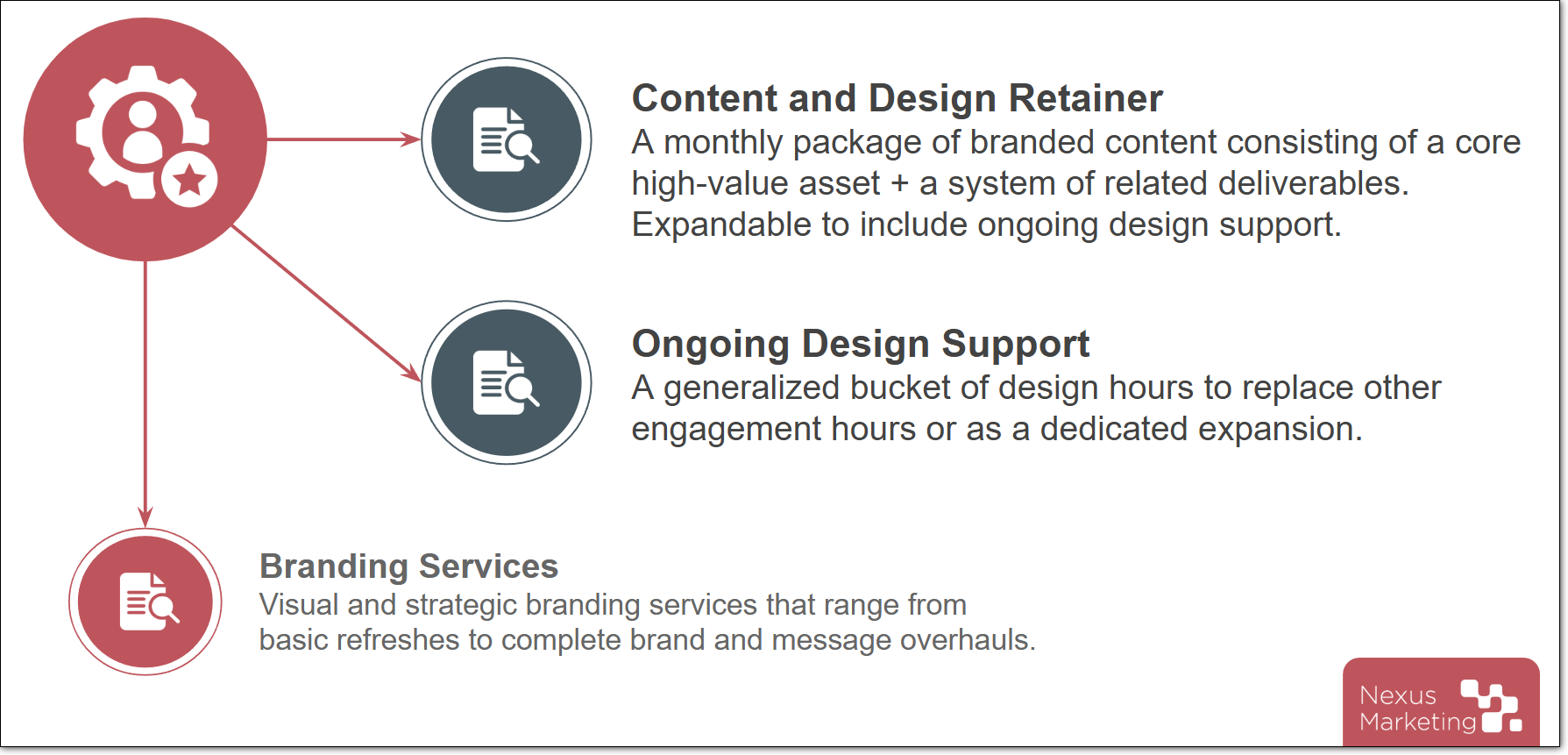
We offer three ways to tap into our updated design services:

1. Content and design retainers

While one-off design efforts address your immediate needs, our strategic design packages are curated to build sustained momentum and drive long-term value.

How these packages work:

  • Your design retainer serves as a monthly content engine, ensuring a steady stream of assets to support your brand.
  • An Anchor Asset (a high-value lead capture resource or webinar) is selected, developed, and distilled into a variety of multichannel assets.
    • Your Anchor Asset can be designed to meet a custom need or follow one of our recommended approaches:
      • Subject matter interviews converted into clickworthy guides and opinion pieces
      • Proprietary data turned into branded state-of reports and industry trend guides
      • Voice of customer insights from your own sales calls formatted into sales enablement materials
      • Webinar recaps, polished eBook versions of your events to use for lead capture or follow-up
      • Webinar production packaged with additional shortform clips and multichannel assets
  • A tiered service structure and optional add-ons help you build the package that best meets your needs.

These packages can also be expanded with additional design support hours to meet your changing needs.

Learn more about content and design retainers here.

2. Ongoing design support

These services function like our existing approach, providing targeted design support for campaigns and assets such as webinar kits, sales enablement collateral, and video production. These hours can be swapped into an existing Nexus engagement or added as a dedicated expansion.

With this service, Nexus operates as a dedicated, on-demand creative resource, saving you time and upping the visual quality of your visual materials.

3. Brand identity and strategy

Brand identity is the foundation of the impression your business makes on potential customers.

Whether you’re looking to refine an existing look or build a new identity from the ground up, the Nexus team can provide strategy development and visual design tailored to your unique goals. Our branding services range from foundational brand refreshes—focusing on core elements like logos and color palettes—to comprehensive identity systems that define your brand’s voice, positioning, and visual language.

Learn more about our branding services here.


Example design deliverables

Check out this collection of sample design deliverables we’ve produced:


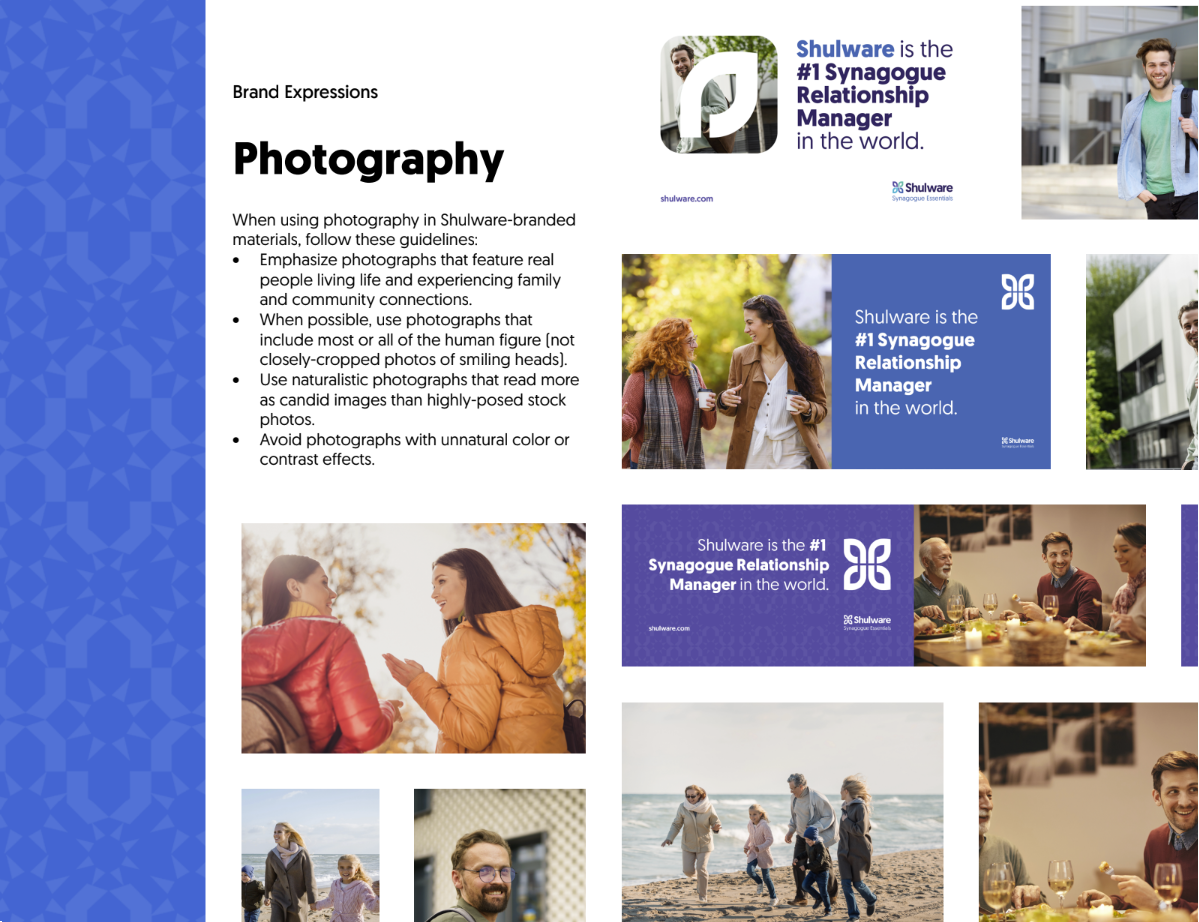
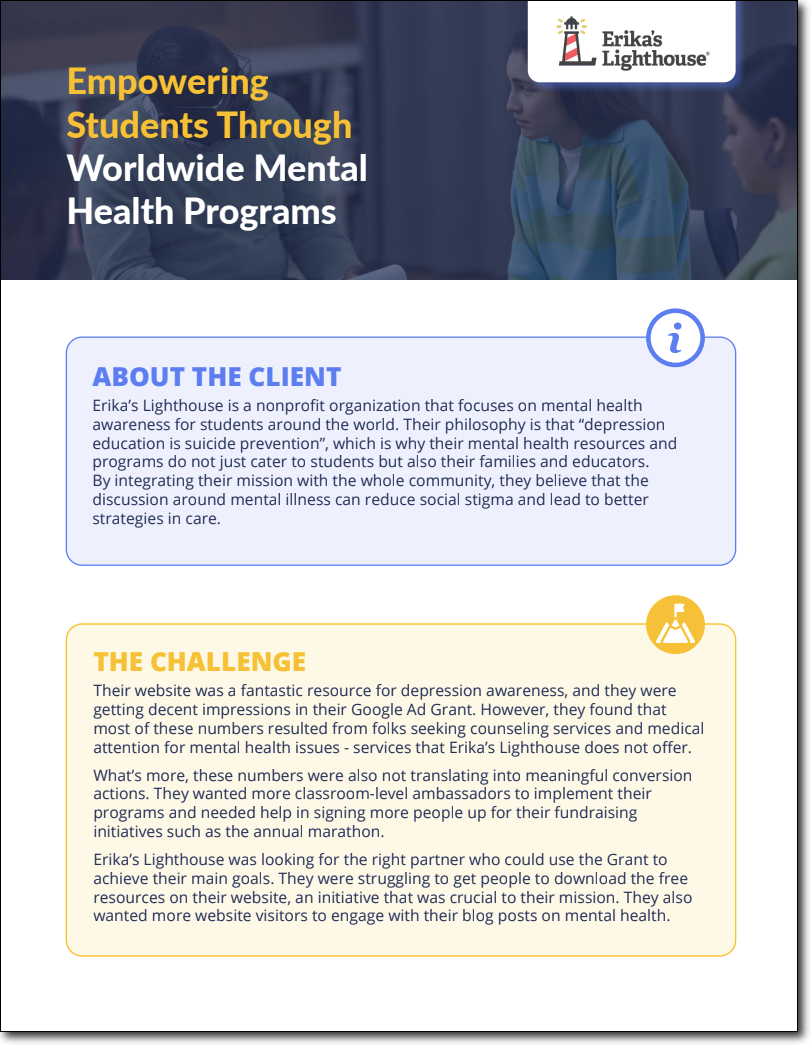
Technical resource for a localized education audience

Boosts credibility, provides value, and reinforces brand


Branded sales deck

Makes a stellar impression, easily templatized for future use


Quick sales enablement graphic

Easily shared with prospects to offer support and build buy-in

Sales enablement content


Niche educational resource

Serves as true thought leadership for the brand while capturing leads

UpMetrics case study


Educational how-to guide

Evergreen, high-value content for lead capture

Winspire ebook


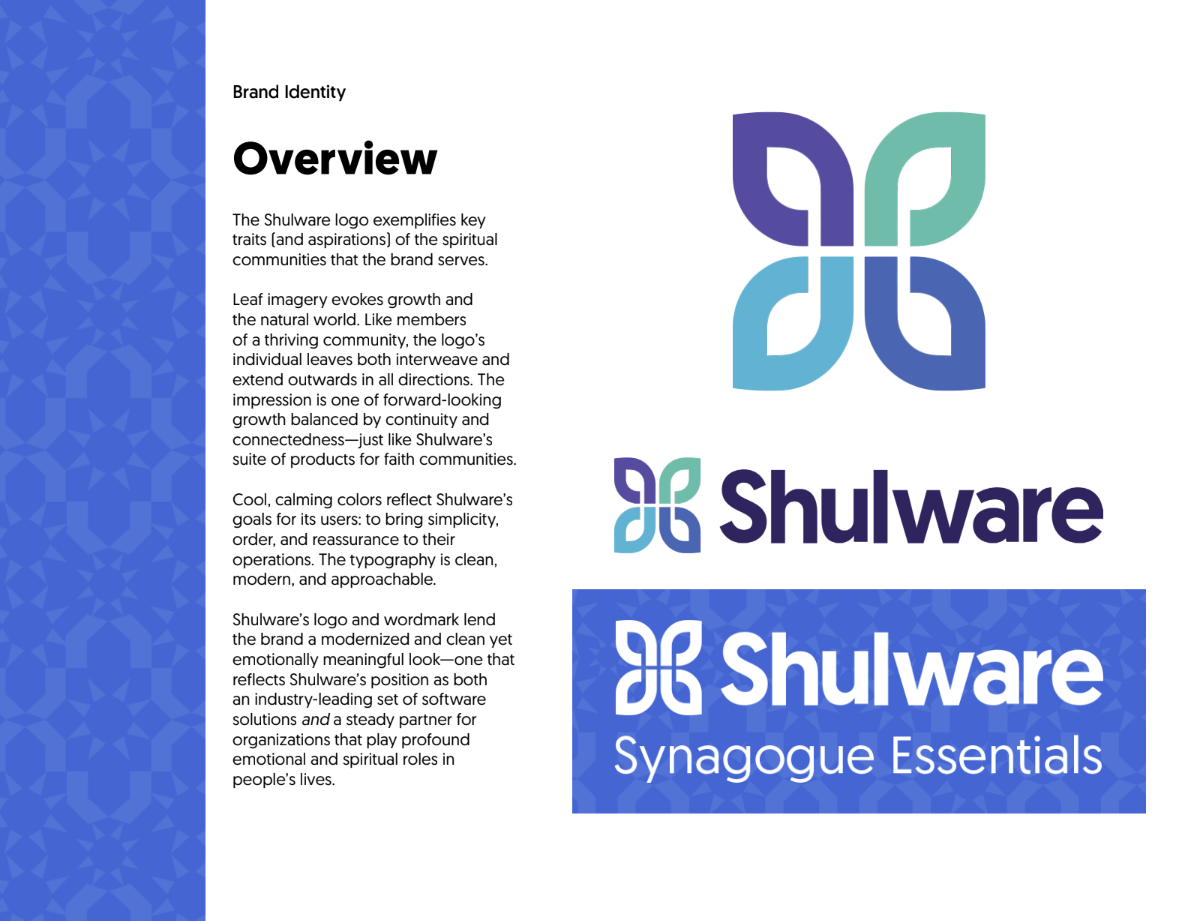
Refreshed brand guidelines

Updated brand assets and comprehensive style guidelines to ensure consistency and impact


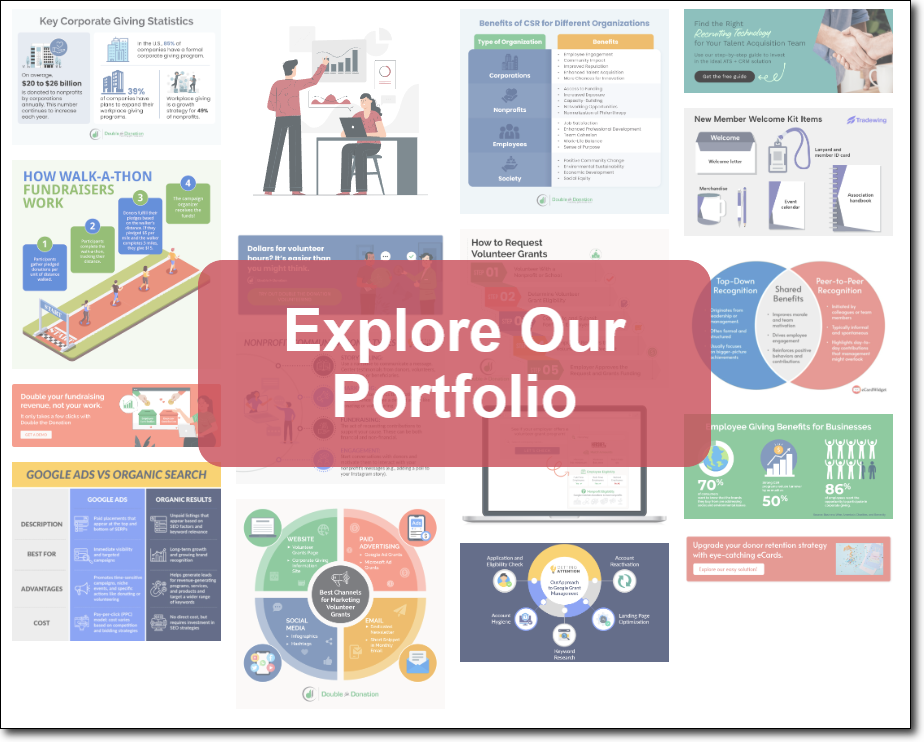
Check out more examples of our graphic design work in our portfolio.

Graphic design portfolio


Partnering with Nexus for design services

To support your brand’s unique needs, we provide flexible solutions ranging from monthly content engines and on-demand design support to strategic branding.

Whatever design service you need, our goal is to ensure it integrates seamlessly with your current workflows, providing creative expertise and driving your business forward while saving you time.

Ready to learn more about how our expanded design capabilities can support your brand? Learn more about our services and let us know if you have any questions.

If you’re already a Nexus client, contact your Account Manager to learn more and discuss your options. If you’re not yet a Nexus client, contact us for a custom consultation.

Nexus Updates: RevOps-Aligned HubSpot Enhancement and Implementation Services

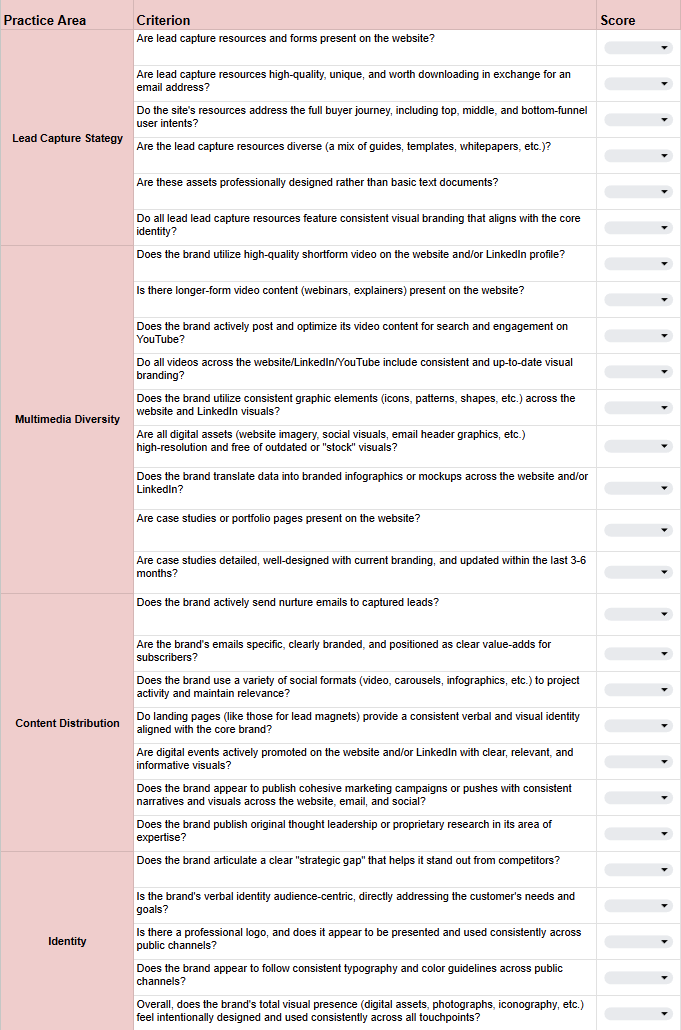
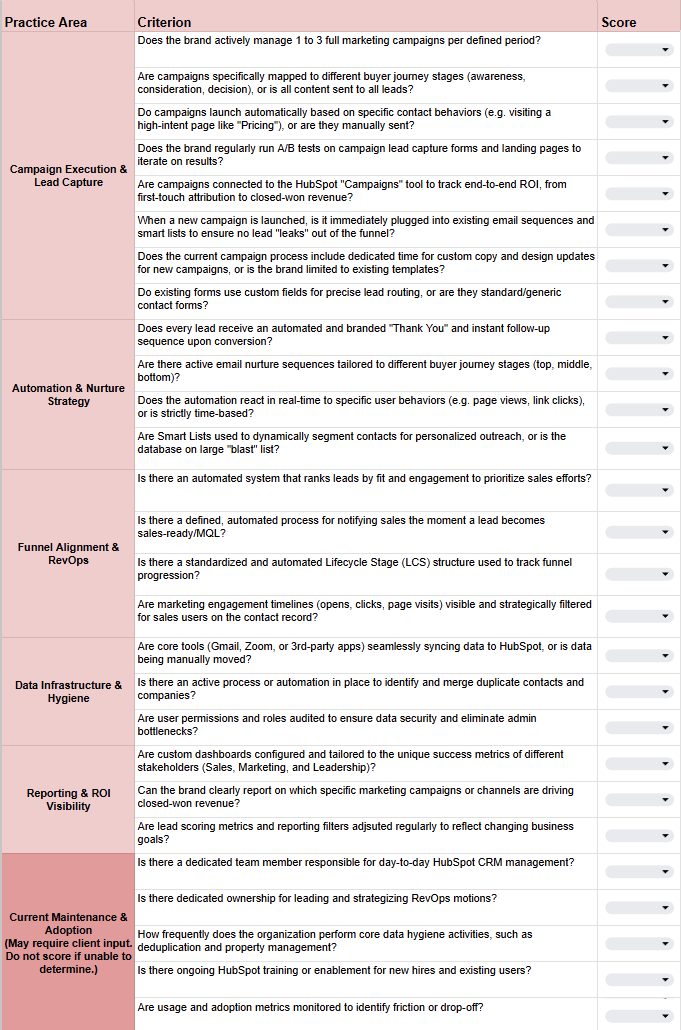
We’re excited to provide an overview of our offering for existing and new clients: HubSpot enhancement, implementation, and onboarding support.

Our goal: transform your HubSpot CRM into a hassle-free revenue engine that attracts, nurtures, and converts more leads with less work.

As an official HubSpot Solutions Partner, we take a RevOps-driven approach to transforming how your business uses this powerful platform to drive impact and close deals.

Whether you’re deploying HubSpot for the first time or optimizing an existing setup, Nexus ensures full CRM alignment, marketing automation, and lead generation optimization tailored to your unique mission-driven market.


Quick context

HubSpot services are offered in addition to and separately from your existing SEO, GEO, and/or design engagements with Nexus Marketing.

If your business uses HubSpot or is considering a CRM switch, contact your account team or reach out to learn more about how we can help.

We’re the leading agency for brands selling to the mission-driven space. Our years of experience speaking to these audiences give you a leading edge when developing buyer personas, building sales workflows, scoring leads, and more.


Our take: Why HubSpot implementation needs a RevOps approach

HubSpot is powerful—but even advanced marketing automation platforms underperform without team and process alignment.

RevOps, or Revenue Operations, aligns marketing, sales, and service teams around shared revenue goals. In HubSpot, it ensures data-driven lead management, automation, and reporting, making your CRM a true revenue engine.

By combining HubSpot implementation with RevOps practices and our deep mission-driven knowledge, Nexus helps businesses:

  • Align marketing, sales, and customer success teams around shared revenue goals.
  • Automate lead scoring, nurturing, and lifecycle stage transitions.
  • Build dashboards and reporting that reveal what drives actual revenue.
  • Integrate HubSpot with your existing tech stack for streamlined operations.

HubSpot + RevOps = predictable revenue growth


What to expect from HubSpot implementation by Nexus

Our standard HubSpot implementation services include a comprehensive range of one-time and ongoing activities designed to help you start generating an ROI as fast as possible.

Highlights include:

1. CRM & workflow setup

  • Configure HubSpot for your marketing, sales, and/or service workflows
  • Define lifecycle stages, lead scoring, and pipeline stages for optimized lead management

2. Data-driven Rev-Ops alignment

  • Build automated dashboards showing KPIs across teams
  • Identify pipeline bottlenecks and recommend ways to optimize every stage of your revenue funnel

3. Automated marketing & lead nurturing

  • Deliver personalized, automated outreach campaigns
  • Prioritize high-fit leads ready for your sales team

4. Team training & enablement

  • Enable your teams to use HubSpot efficiently and adopt best practices
  • Align stakeholders with standardized reporting and workflows

5. Seamless integrations

  • Connect HubSpot with your existing tools for full operational alignment
  • Ensure your teams are working smarter, not harder

For more details on specific deliverables and activities, please explore our HubSpot service overview page or contact your Nexus account team.


Why invest in your HubSpot instance?

HubSpot can be a transformative platform for businesses when well-configured and used with best practices in mind. A fine-tuned HubSpot instance can:

  • Improve your lead conversion and pipeline velocity
  • Enhance your reporting, forecasting, and revenue visibility
  • Improve your customer retention rate
  • Reveal more and larger upsell opportunities

But even beyond these strategic benefits, consider the time saved by a well-running CRM. Clunky systems that aren’t used consistently by all teams or that are missing key workflow setups or integrations can easily waste more time than they free. Not to mention, software licenses get costly fast when they don’t generate an appropriate ROI. HubSpot should empower your business to drive impact and close more deals.

Why partner with Nexus Marketing, specifically, for HubSpot implementation? A few reasons:

  • We’re a certified HubSpot Solutions Partner. Our team brings years of specialized expertise working with HubSpot.
  • We take an integrated RevOps-driven approach to align revenue teams and ensure your ROI remains top of mind.
  • We specialize in the mission-driven market and know how to reach, engage, and convert the audience you need.
  • If you already work with us, we already understand your business and brand. This contextual knowledge helps us lay out tailored workflows, buyer personas, reporting protocols, and more faster than a generalist agency.

FAQs about our HubSpot services

  • What does HubSpot implementation include?
    • HubSpot implementation includes CRM setup, workflow configuration, marketing automation, dashboards, reporting, and team training, all customized to your business goals.
  • Can Nexus optimize an existing HubSpot setup?
    • Yes. We audit current processes, align lifecycle stages and lead scoring, and implement RevOps best practices for measurable growth.
  • How quickly will we see results?
    • Improvements in lead quality, sales velocity, and reporting clarity are typically visible within 60–90 days after implementation.
  • Why choose Nexus over other HubSpot partners?
    • Nexus combines HubSpot expertise with a RevOps approach, aligning teams, optimizing automation, and delivering predictable revenue results.

Let’s get started

Ready to turn HubSpot into a true revenue engine for your business? Learn more about our HubSpot implementation services here.

If you’re already a Nexus client, please contact your Account Manager for more information. If you don’t yet work with Nexus Marketing, please contact us to set up a consultation.

Beyond Text: Why We’re Using Multimedia to Demonstrate EEAT

In today’s digital landscape, lengthy articles consisting mostly of text are no longer enough to ensure your brand stands out online.

As a team of content creators focused on driving leads for mission-driven clients, we’ve seen the bar for “high-quality content” rise dramatically. Focusing on keywords and word count alone won’t help you reach your goals. Instead, you must actively consider how to boost engagement, improve user experience, and—most importantly—prove E-E-A-T (Experience, Expertise, Authoritativeness, and Trustworthiness).

At the same time, Generative AI hasn’t only changed how we write, but it has also altered how search engines process and interpret content. To succeed in the new era of Generative Engine Optimization (GEO), content must be multimodal, dynamic, and genuinely helpful.

That’s why our content team at Nexus has adopted a new strategy: using Canva AI to rapidly create and embed interactive multimedia content elements directly into our client blogs.

This post explores the “why” behind this strategic shift and details “how” we’re doing it.

Optimize your digital strategy with more tips from our marketing and SEO experts. Sign up for the Nexus newsletter. 

The “Why”: Content as an Experience, Not Just a Page

We chose to lean into interactive multimedia content for four specific, data-backed reasons.

Descriptive alt text: An infographic titled "The GEO & E-E-A-T Advantage: Static Text vs. Multimedia Experiences." It compares two approaches in columns. The left column, "The Old Way (Static Text)," lists: Engagement: Passive. Low engagement & conversions. E-E-A-T: Claims expertise ("We are experts..."). GEO: Practically "invisible" to AI. It's just text, so AI models can't "cite" it. Queries: Struggles to answer complex, conversational queries. The right column, "The New Way (Multimedia Experience)," lists: Engagement: Interactive. A "conversation" with 52.6% higher engagement. E-E-A-T: Demonstrates expertise (e.g., an interactive calculator shows clear knowledge and experience). GEO: "Feeds" the AI. Provides videos, charts, and data for AI to use as a source. Queries: Provides a rich, comprehensive answer (video + tools + text). The bottom of the image includes the Nexus Marketing logo.

1. To Skyrocket Engagement and Conversions

Static content is passive. Interactive content encourages active engagement, and the data proves it:

For our clients, engagement isn’t just a vanity metric. It’s a direct line to a high-quality lead. When a user completes a quiz or calculator, they receive immediate, concrete value. This value exchange makes them far more likely to convert. In fact, 40.1% of users who start a quiz will input their information to become a lead.

2. To Demonstrate E-E-A-T

Anyone can claim expertise. Interactive content shows it.

A blog post that claims, “We are fundraising experts,” is weak. But a blog post that features an interactive calculator showing a nonprofit how much they could raise with a new strategy? That demonstrates direct, verifiable experience.

An interactive timeline, a detailed infographic, or a how-to video demonstrates firsthand expertise in a way plain text simply cannot. It gives potential clients a taste of the value they can expect when they choose to work with your organization.

3. To “Feed” the Generative AI Engine (GEO)

This is perhaps the most critical reason for our shift. Generative AI models, such as those powering Google’s AI Overviews, are designed to be multimodal. They actively look for videos, images, charts, and data from interactive tools to synthesize their answers.

If your content is just text, it’s effectively invisible to the parts of the AI that are looking for rich media to feature.

By embedding data-rich infographics, charts, and video clips, we provide AI models with structured, verifiable data to cite, making our clients the source of truth for their industry.

4. To Answer Complex, Conversational Queries

The future of search is Generative Engine Optimization (GEO), which focuses on answering long-tail, context-rich questions (e.g., “What’s the best fundraising consultant for a small nonprofit in Atlanta?”).

A simple blog post may struggle to provide a comprehensive answer to this. But imagine a page that features:

  • A 30-second video testimonial from a local nonprofit.
  • An interactive calculator to estimate consulting ROI.
  • An infographic of “Top 5 Local Consultants and Their Services.”

This multimedia-rich page provides a comprehensive, structured answer that the AI can confidently draw from, positioning our client as the definitive resource.

The “How”: The Nexus Approach to Canva AI

To achieve these goals, our team needed a tool that was powerful, fast, and—above all—flexible. We chose Canva AI.

While other AI tools are great, Canva’s all-in-one platform allows our content creators (not just designers) to quickly build assets that are perfectly branded for each client. This ability to create truly custom, on-brand assets at scale is a game-changer.

We don’t just “use” Canva AI; we have a specific workflow to ensure every element is effective, on-brand, and technically sound.

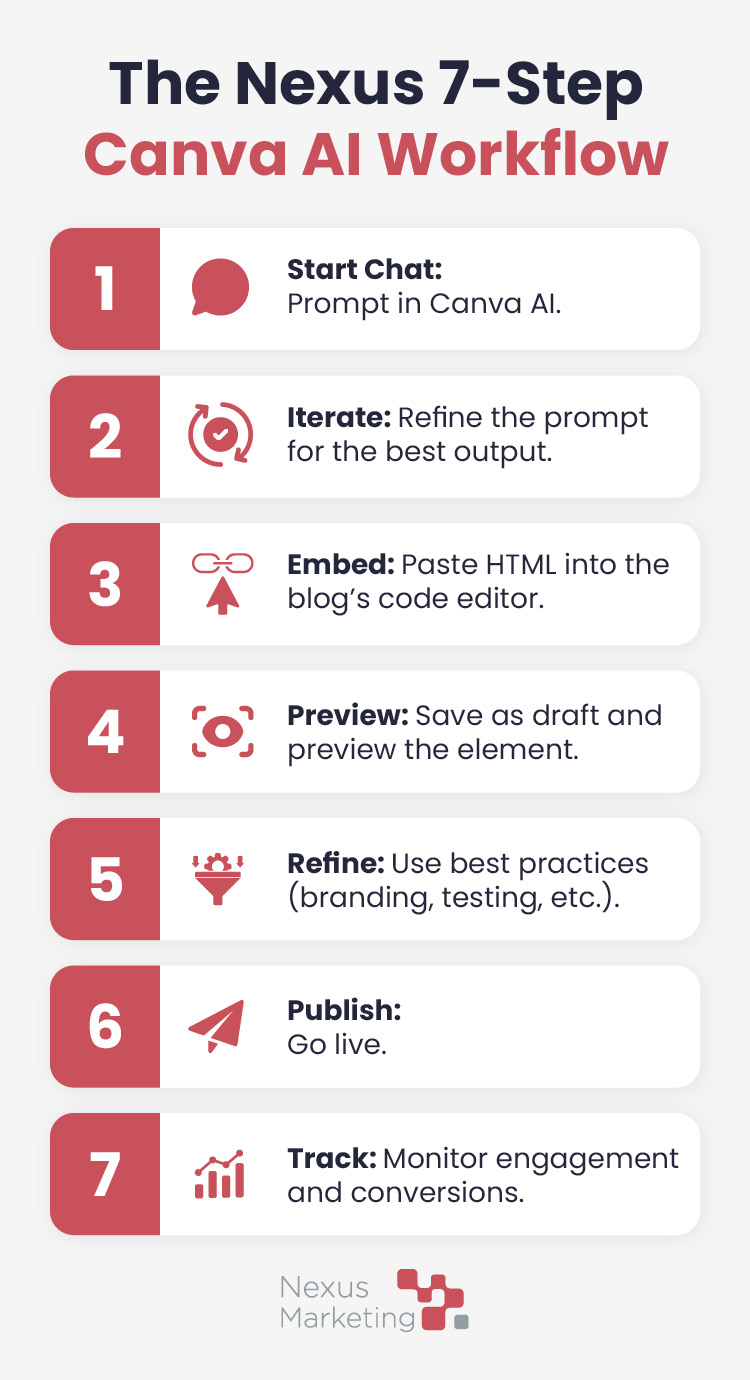
How We Leverage Canva AI in 7 Steps

An infographic titled "The Nexus 7-Step Canva AI Workflow." It lists seven numbered steps in vertical order. Start Chat: Prompt in Canva AI. Iterate: Refine the prompt for the best output. Embed: Paste HTML into the blog's code editor. Preview: Save as draft and preview the element. Refine: Use best practices (branding, testing, etc.). Publish: Go live. Track: Monitor engagement and conversions. The infographic includes the Nexus Marketing logo at the bottom.

  1. Navigate to canva.com/ai and start a new chat.
  2. Enter a prompt (e.g., “Provide ideas for an interactive element to add to this nonprofit CRM blog post: [URL]”).
  3. Review the first output and iterate on the prompt as needed.
  4. Copy the final HTML code into the code editor of the client’s blog post.
  5. Save as a draft and preview to ensure it’s working correctly.
  6. Iterate and refine using our best practices (see below).
  7. Publish and track engagement.

Our Top Best Practices for Canva AI Implementation

Creating the element is just the first step. Integrating it successfully requires a combination of technical and strategic approaches. Here’s how we fully optimize multimedia content to serve the needs of both users and LLMs:

  1. Be specific about branding: We provide HEX codes, specific font names, and even paste in existing images from the client’s site so Canva AI can perfectly match the brand style.
  2. Isolate the styling: We specifically prompt Canva AI to “only style the multimedia content itself.” This prevents the HTML from overriding the entire page’s CSS in the client’s CMS.
  3. Use Gemini to refine: Canva AI provides a great V1. We often copy its code into Gemini to fine-tune branding, add new features, or troubleshoot when it isn’t displaying properly.
  4. Embed the conversion journey: We ask Canva to add CTA buttons directly within the interactive element (e.g., a “Book a Demo” button on a quiz results page) to move users down the funnel.
  5. View in its intended form: We always preview the HTML, either by pasting it into a blank draft in the client’s CMS or by saving it as an HTML file in Notepad and opening it in Chrome.
  6. Perform rigorous user testing: Interactive elements are part of our standard peer review. The editor must complete the quiz, use the calculator, etc., flagging any points of confusion, unclear instructions, or new conversion opportunities.
  7. Save the code (twice!): We always save a backup copy of the final HTML code in a separate document, just in case anything happens to the design or thread in Canva.

Real Examples of Multimedia Content Driving Engagement

So, what do these interactive elements look like in practice? Check out a few examples of how we leverage Canva AI to make online content more engaging:

A quiz to help dance businesses determine whether they’re reading for automation:

An interactive fundraising strategy template to help nonprofits develop a customized plan:

A checklist to help charitable organizations prepare for an audit:

As you can see, we’re not focusing on providing just one type of multimedia experience—we’re taking a comprehensive approach to ensure that clients’ content features the type of interactivity that truly enhances user experience and drives leads.

Is Your Content Ready for the AI-First World?

If your blog is still just text on a page, you’re missing out on engagement, leads, and visibility in the new generative AI landscape.

Contact Nexus Marketing today for help building your multimedia strategy. We’re now offering a comprehensive Canva AI audit and multimedia creation service to help you transform your static content into an interactive, lead-generating asset.

We‘ll identify 8-10 pieces of content on your website that will benefit most from this interactive content and develop a custom plan for creating, implementing, and monitoring the success of these new multimedia elements.

Your Content Needs to Be an Experience

The bar for content has been raised. Success in 2026 and beyond requires a shift in thinking—from “words on a page” to “experiences on a screen.”

By integrating multimedia and interactive elements with Canva AI, we not only improve engagement but also future-proof our clients’ content. We are demonstrating their E-E-A-T, feeding the GEO engine, and providing the comprehensive answers that both users and AI are searching for.

Advance your authority with Nexus Marketing. Work with us to audit your brand presence, strengthen your SEO, and develop an intelligent digital marketing strategy.

The Nexus Approach: Schema Markup Creation & Implementation

The rise of artificial intelligence (AI) has impacted countless industries and everyday activities, including digital marketing and online search. While Nexus has been primarily focused on search engine optimization (SEO), our team has recently added generative search optimization (GEO) into our repertoire to keep our clients at the forefront of current digital marketing trends and further enhance search visibility for client content.

According to Search Engine Land, GEO refers to “the process of optimizing your website’s content to boost its visibility in AI-driven search engines such as ChatGPT, Perplexity, Gemini, Copilot and Google AI Overviews.”

GEO is similar to SEO in that it focuses on increasing content visibility, enhancing user experience, and building authority. It builds on SEO principles to appeal to generative AI engines that prioritize contextual relevance and the connections between a brand entity and its content.

A crucial element of GEO is schema markup, which helps generative AI better understand client content. If your Nexus engagement includes GEO or your business is curious about investing in GEO, you may wonder what exactly schema markup is and how our team handles it behind the scenes. Let’s explore schema markup and the Nexus approach to this vital part of the GEO process.

Optimize your digital strategy with more tips from our marketing and SEO experts. Sign up for the Nexus newsletter.

What Is Schema Markup?

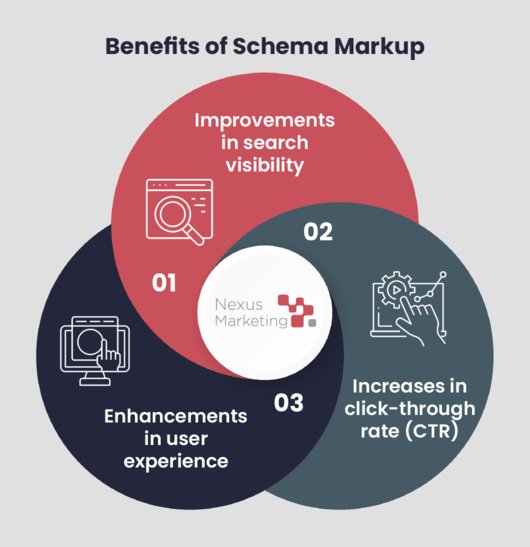
Schema markup refers to structured data that helps generative AI better understand client content and display extra details in search results. By creating and implementing this code on client websites, we can help our clients earn:

Infographic showing the benefits of schema markup, as explained in the text below

  • Improvements in search visibility. Schema markup helps Google create richer search results that often appear at the top of search engine results pages, leading to increased search visibility.
  • Increases in click-through rate (CTR). When Google shows your content near the top of the page in an engaging way, users are more likely to click through to your website.
  • Enhancements in user experience. Schema markup helps users quickly learn more about your content and business and easily decide whether to dig deeper.

What Are the Types of Schema Markup the Nexus Team Works With?

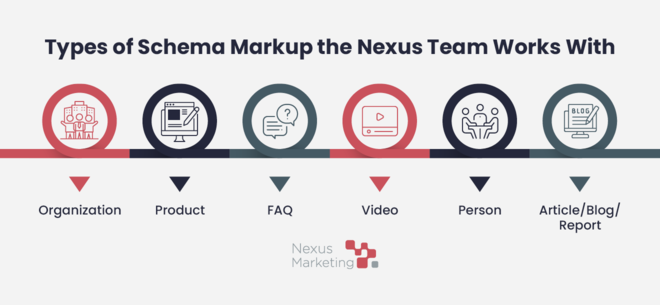
The Nexus team works with the following types of schema markup to enhance client content:

Infographic showing the types of schema markup the Nexus team works with, as explained in the text below.

Organization

Organization schema helps Google better understand a client’s administrative details and connect content to the organization as a whole. We typically add organization schema to a client’s home page and about page, but it is also sometimes nested within other schemas that are automatically generated by plugins like Yoast.

Example Organization Schema Markup

<script type=”application/ld+json”>
{
“@context”: “https://schema.org”,
“@type”: “Organization”,
“name”: “Insert Business Name Here“,
“url”: “Insert Website Link Here“,
“logo”: “Insert Logo Link Here“,
“sameAs”: [
Insert Social Media Links Here
]
}
</script>

Product

Product schema provides Google with more information about a client’s products to enrich search results. Available fields may include price, availability, review ratings, and shipping information. We add product schema to relevant product pages.

Example Product Schema Markup

<script type=”application/ld+json”>
{
“@context”: “https://schema.org/”,
“@type”: “Product”,
“name”: “Insert Business Name Here“,
“image”: “”,
“description”: “Insert Product Description Here“,
“review”: {
“@type”: “Review”,
“reviewBody”: “Insert Product Review Here“,
“author”: {“@type”: “Person”, “name”: “Insert Reviewer Name Here“}
}
}
</script>

FAQ

If your content includes a Q&A format, FAQ schema can help Google better understand this content and display it in rich search results. We add FAQ schema to any blog or product pages that have Q&As.

Example FAQ Schema Markup

<script type=”application/ld+json”>
{
“@context”: “https://schema.org”,
“@type”: “FAQPage”,
“mainEntity”: [{
“@type”: “Question”,
“name”: “Insert Question Here“,
“acceptedAnswer”: {
“@type”: “Answer”,
“text”: “Insert Answer Here
}
} }]
}
</script>

Video

Video schema makes it easier for Google to find, understand, and display your video content. Search results may show details like the video description, thumbnail URL, upload date, and duration. We add video schema to clients’ most important blog or product pages with videos.

Example Video Schema Markup

<script type=”application/ld+json”>
{
“@context”: “https://schema.org”,
“@type”: “VideoObject”,
“name”: “Insert Video Name Here“,
“description”: “Insert Video Description Here“,
“thumbnailUrl”: “Insert Thumbnail URL Here“,
“uploadDate”: “YYYY-MM-DD“,
“duration”: “PTXXMXXS”,
“contentUrl”: “Insert Content URL Here
}
</script>

Person

Person schema helps Google better conceptualize the people who work at and contribute content to your business. We add person schema to author bio pages so Google connects client authors with their brand, industry, and content expertise.

Example Person Schema Markup

<script type=”application/ld+json”>
{
“@context”: “https://schema.org/”,
“@type”: “Person”,
“name”: “Insert Name Here“,
“url”: “Insert Page URL Here“,
“image”: “Insert Image Link Here“,
“sameAs”: “Insert Social Media Links Here“,
“jobTitle”: “Insert Job Title Here“,
“worksFor”: {
“@type”: “Organization”,
“name”: “Insert Business Name Here
}
}
</script>

Article/Blog/Report Schema

Article, blog, and report schema mark pages as their correct content types, helping Google to better understand the content and show relevant title text, images, and date information in search results. We add this type of schema to blog articles and downloadable resources.

Example Article/Blog/Report Schema Markup

<script type=”application/ld+json”>
{
“@context”: “https://schema.org”,
“@type”: “Article”,
“headline”: “Insert Article Title Here“,
“author”: {
“@type”: “Person”,
“name”: “Insert Author Here
},
“datePublished”: “Insert Publishing Date Here“,
“url”: “Insert Article URL Here
}
</script>

How Does the Nexus Team Create Schema Markup?

After checking a client’s most important pages for schema using tools like Schema Markup Validator and Google Search Console’s Rich Results Test, the Nexus team identifies and creates missing schema markup using a combination of the following methods:

  • Working directly through the CMS. Some schema types can be configured directly from your CMS, particularly if you use Yoast SEO Premium. Here, you can add basic organization and article, blog, or report schema across your site. Systems like WordPress also allow you to create author schema by updating user profiles in the backend with information like their LinkedIn profiles and job titles.
  • Using schema-specific tools. For other types of schema or clients working with other content management systems, we create schema using schema-specific tools like this Schema Markup Generator. This tool allows you to choose the type of schema you’d like to create, fill in the required fields, and copy and paste the finished product.
  • Leveraging ChatGPT. More complex schema scenarios often require working with ChatGPT. For example, ChatGPT can be helpful in adding additional fields to schema generated by Yoast or Schema Markup Generator to enrich what’s already there.

How Does the Nexus Team Implement Schema Markup?

The implementation process depends on your CMS, the type of schema your content needs, and whether we’re adding schema to an individual page or across multiple pages. Even among clients with the same CMS, we might have to take a different approach depending on your exact plugins and theme.

Implementing sitewide schema usually involves installing plugins or altering theme templates. Don’t worry, though! The plugins we use are safe, and if anything goes wrong when editing the templates, they’re easy to revert.

Since the majority of our clients use HubSpot or WordPress as their CMS, we typically work with those platforms. In HubSpot, individual page schema goes in the Head HTML section under “Additional Code Snippets,” which is in Advanced Settings; the process is simple.

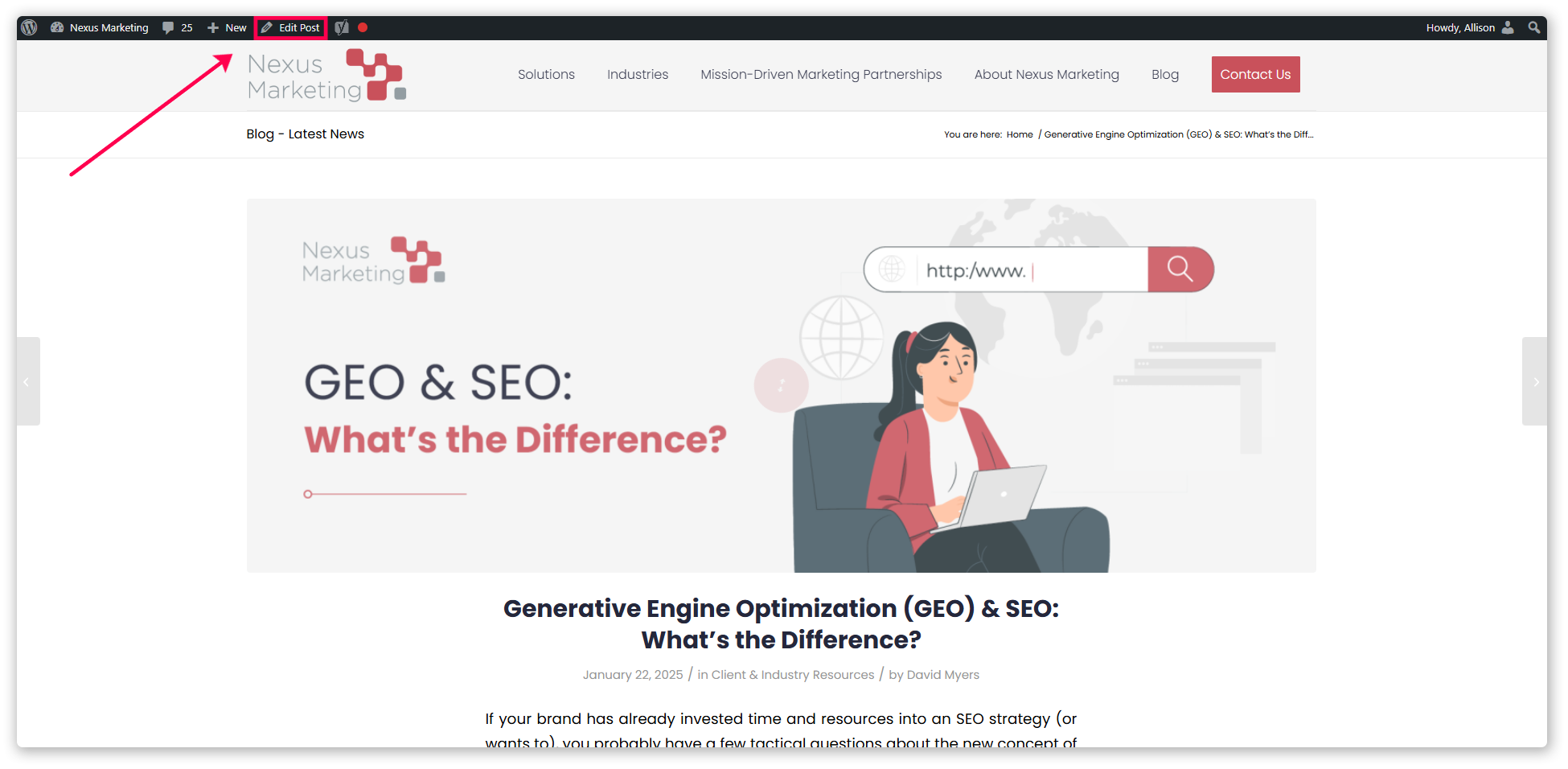
Let’s walk through an example of implementing individual page schema on the Nexus blog, which uses WordPress. We’ll add FAQ schema to this blog post about the differences between GEO and SEO:

1. Navigate to the post and click on “Edit Post” in the upper left corner.

Screenshot pointing to “Edit Post” on a Nexus blog post.

2. Click “Screen Options” in the upper right corner.

Screenshot showing the “Screen Options” button within WordPress.

3. Make sure “Custom Fields” is toggled on.

Screenshot showing the “Custom Fields” box is checked.

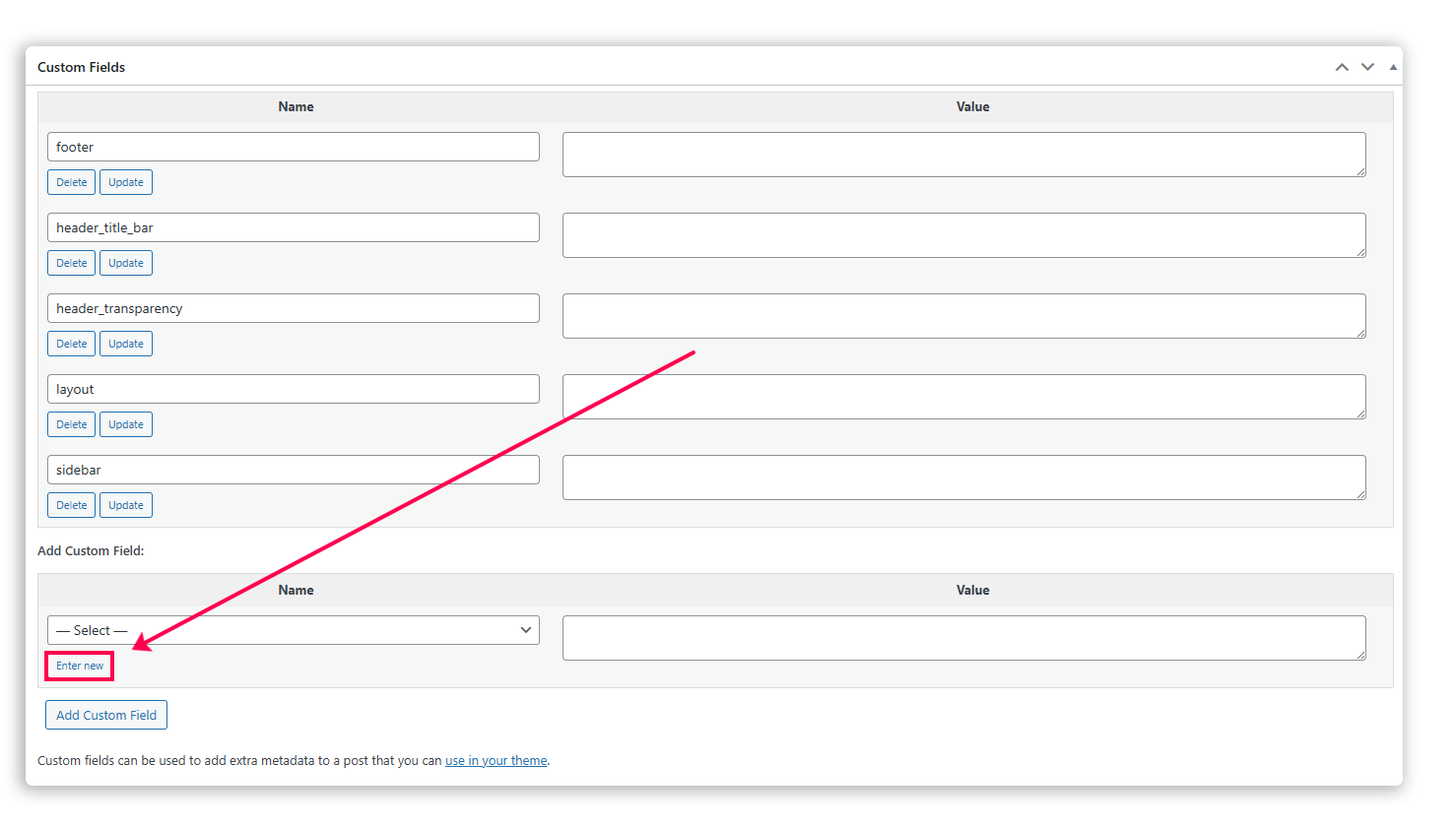
4. Scroll to the bottom where it says “Add Custom Field” and click “Enter new.”

Screenshot of the custom fields section pointing to “Enter new.”

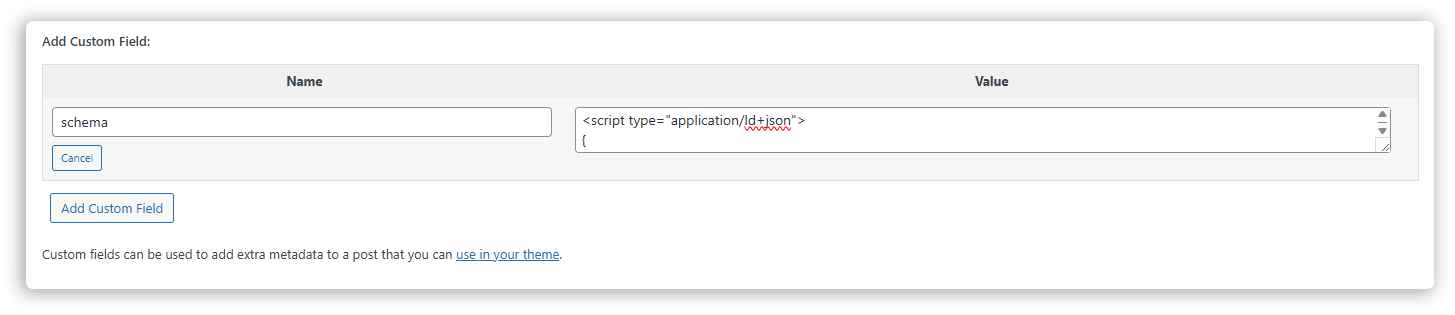
5. Create a field called “schema” and paste your schema markup code.

Screenshot of a field called “schema” with schema markup code.

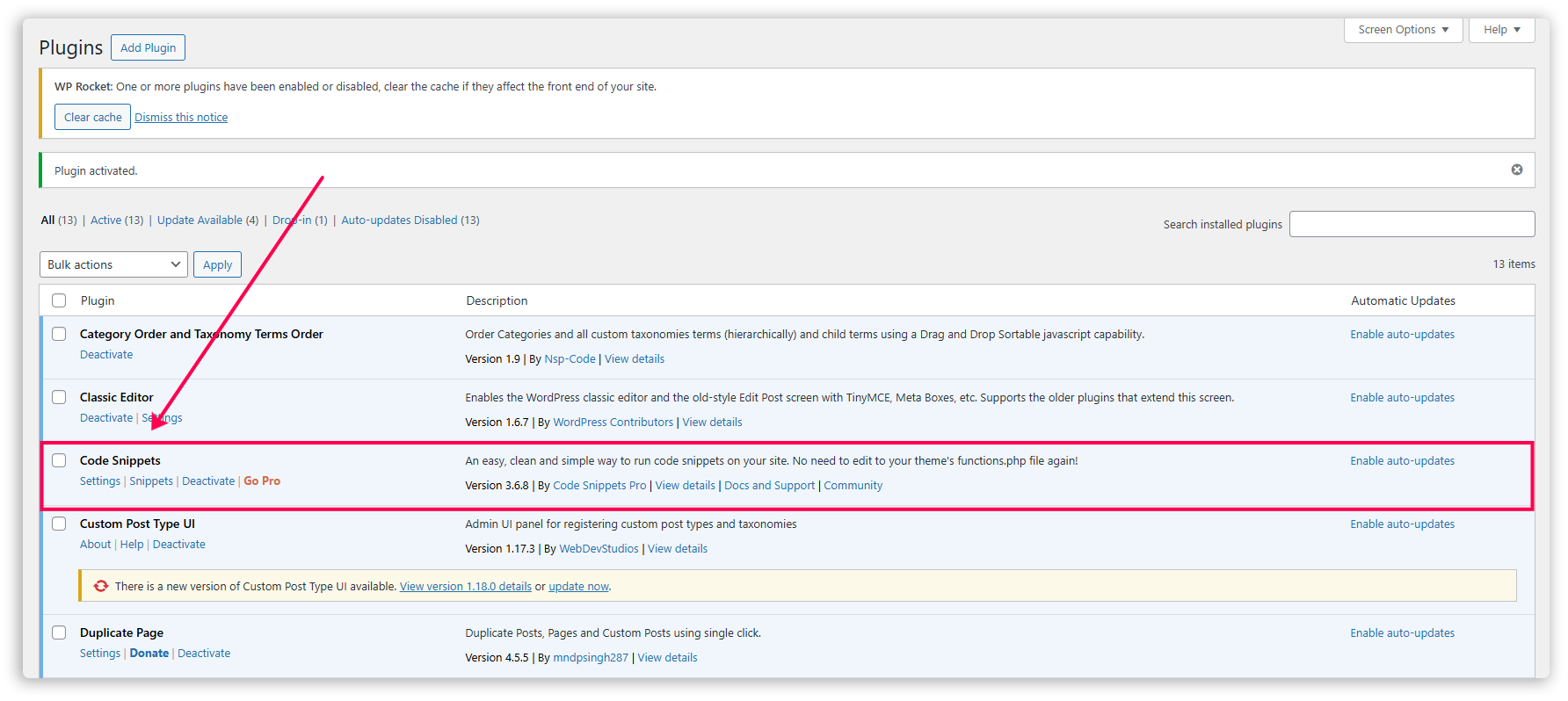
6. Download and activate the Code Snippets plugin.

Screenshot pointing to the Code Snippets plugin.

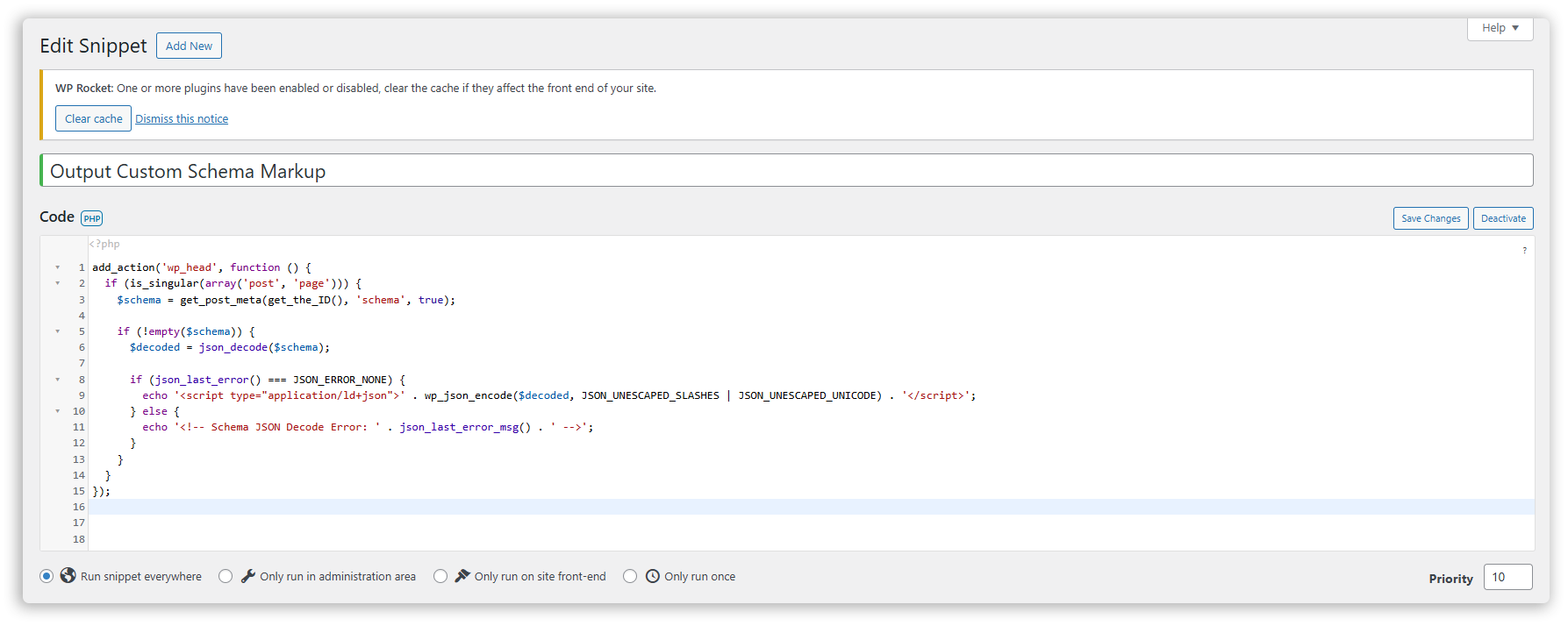
7. Create a new snippet called “Output Custom Schema Markup,” add the appropriate code as shown below, and activate it.

This step automatically inserts schema within the custom field at the head of the page so it runs correctly. It also adds the script type so you don’t have to include it when adding schema to each individual page.

Screenshot showing a new snippet called “Output Custom Schema Markup.”

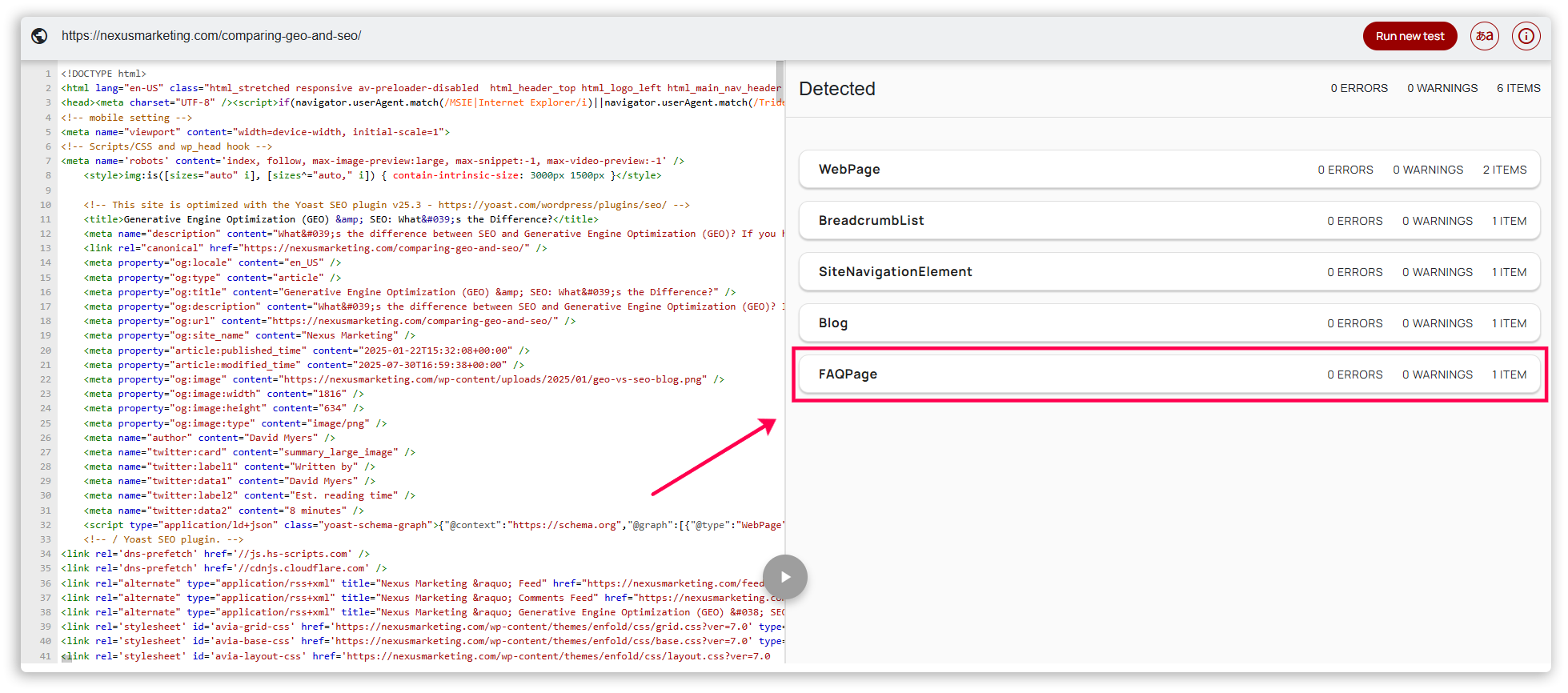
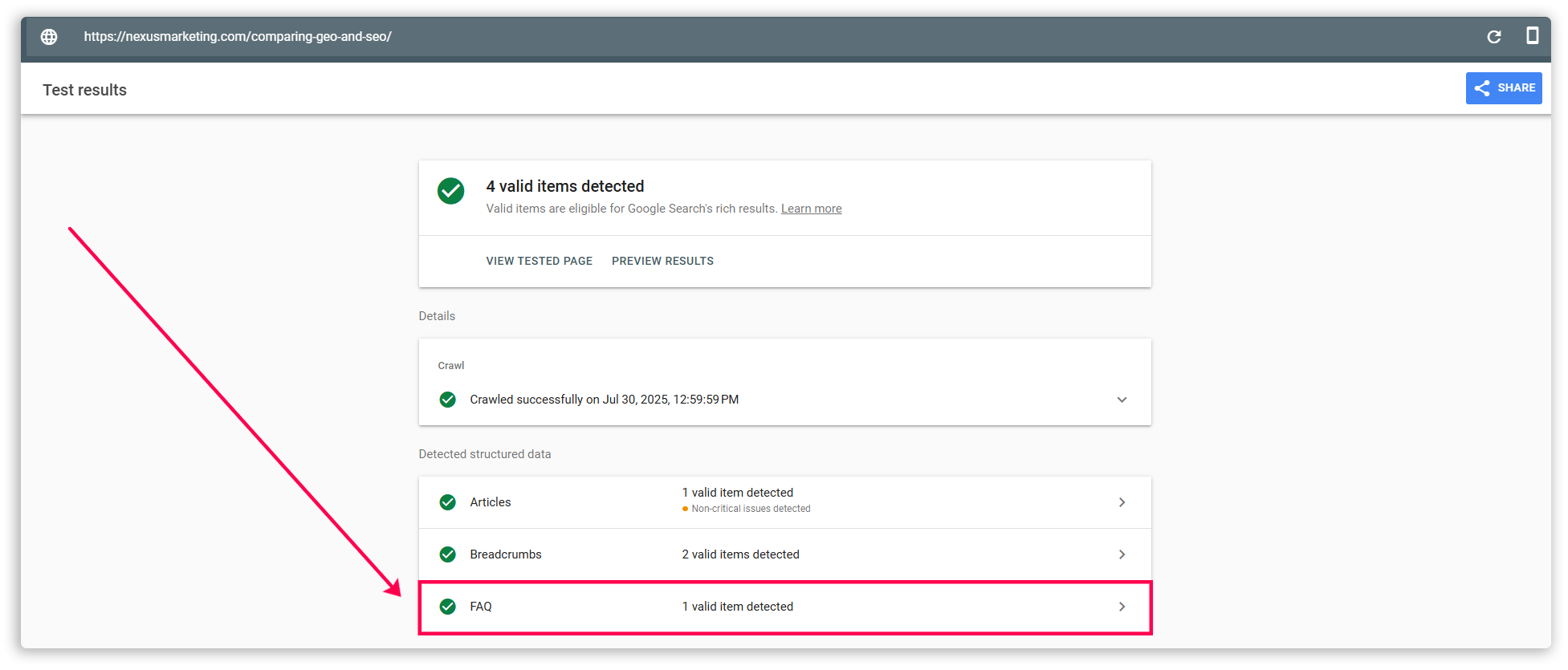
8. Check the results with Schema Markup Validator or Google Search Console’s Rich Results Test.

Screenshot of Schema Markup Validator pointing to FAQ schema being detected.

Screenshot of Google Search Console’s Rich Results Test pointing to FAQ schema being detected.

Again, this process differs significantly based on your CMS, the type of schema your content needs, and where we’re adding schema. The Nexus team will assess these considerations before proceeding to ensure our approach aligns with your needs.

How Does the Nexus Team Troubleshoot Schema Markup Issues?

When we first embarked on the schema markup process, most of our troubleshooting involved working with ChatGPT to identify and rectify any issues. We used specific prompts like “How can I add video schema to an individual page in WordPress built on WPEngine?” and “I added schema to the custom field on a blog post generated using Elementor on WordPress, but it’s not working. What could be wrong?” to gain actionable guidance.

While we still use ChatGPT to work through issues, the team has gained more experience with schema, our knowledge has grown, and we can now more quickly pinpoint and solve schema problems. We’ve compiled a checklist of common issues to check for, which ranges from putting schema in the correct place to wrapping schema code correctly to giving the schema validators enough time to work properly.

As we encounter and solve new problems, we update our internal schema resources to share this knowledge with the rest of the team.

Partnering with Nexus for Schema Markup Creation and Implementation

We hope this behind-the-scenes look at schema markup creation and implementation helped you better understand how the process works and how our team enables it within your CMS. As you can see, creating and implementing schema markup is a complex, multi-step process, which is why our GEO experts at Nexus handle this process for our clients so you don’t have to worry about it.

If you haven’t invested in GEO yet and are interested in starting the process, talk to your Account Manager about assessing your AI readiness and the appropriate next steps.

Not yet a Nexus client? We’d love to hear from you! Contact us to tell us a bit about your digital marketing needs.

Optimize your digital strategy with more tips from our marketing and SEO experts. Sign up for the Nexus newsletter.

The Nexus Approach: Case Studies, Success Stories, & Portfolio Pages

Case studies are invaluable B2B marketing assets. By showing your brand’s work or products in action for real customers, they often go much further to help close deals than even the most effective sales pitches.

However, consistently creating (or starting) your brand’s library of case studies, success stories, and portfolio entries requires time that you might not have.

The Nexus team can help research, write, design, and update your case studies — giving you more time to instead spend engaging all the leads they reach.

What does it look like to partner with Nexus for case study creation? We’ll review our process and a few examples.

Signup for the Nexus newsletter here for more breaking SEO news in your inbox.

Quick Background

Although marketers might use the terms a bit interchangeably, case studies, success stories, and portfolio pages serve slightly different purposes:

  • Case Studies – Often templated, straightforward explanations of a customer’s background and needs, your work together, and the impact, usually with an emphasis on final KPIs
  • Success Stories – More narrative-driven and longer-form versions of case studies that dive deeper into needs, partnership, and impact in a full story
  • Portfolio Pages – Short, visual-driven pages or entries on your website that might include concise background and impact details, often used by brands that offer design services

Why are effective case study materials so valuable? There are a few reasons:

  • They provide deeper social proof than review snippets or ratings.
  • They offer concrete details about your products or services and give leads a clearer idea of what to expect from you.
  • They can engage leads at multiple buying stages, particularly those interested but not ready to contact you or commit to a sales conversation.
  • They can serve as sales enablement assets to share during active conversations to demonstrate work you’ve done for similar clients in the past.

Our Process for Creating Case Study Deliverables

When you partner with Nexus to create new or updated case study materials, what can you expect from the process? We follow these general steps:

  1. Client: Prepare initial thoughts, identify subject(s) of the case study, gather any readily available details and statistics
  2. Client and Nexus account team: Meet to discuss your vision for the deliverable, its subject matter, and any individuals we’ll need to contact to gather additional information/quotes
  3. Nexus: If interviewing your customers or internal stakeholders, draft short questionnaire (5 questions or less) to cover what we’ll need to draft the case study
  4. Nexus: Connect with necessary stakeholders via email and gather relevant information via the questionnaire
  5. Nexus: Draft the case study
  6. Client: Review the case study copy, provide feedback, and return to Nexus for revisions and design
  7. Nexus: Design the web page or PDF version of the case study (if applicable)
  8. Client: Review the finished form of the case study, provide any last feedback, and return to Nexus for finalization
  9. Nexus: Finalize and deliver the case study, publish on the client’s website (if applicable)

Process Variations

Depending on your exact needs and the scope of our work together, we may adjust the case study production process slightly.

  • Depending on the type of case study deliverable, we’ll ask you for different upfront resources or to connect us to the right stakeholder (like for visual assets for portfolio entries).
  • We may cut the questionnaire process if it’s not necessary to the scope of the case study project.
  • Finished products can be delivered as Google Docs, published web pages (if we have site access), or branded PDF files.
    • Published pages and PDFs will require extra time on our end to produce but bring the benefit of immediate deployment.

Examples of Case Study Deliverables

Check out these example deliverables across the three categories of case studies:

Templated Case Studies

Templated case study 1

Templated case study 2

  • PDF case study template for easy reuse
  • We created an easy template for the client to quickly spin up new case studies with our help or on their own. The 2-page PDF serves as a fast sales enablement resource and enriches their site’s library of social proof content.

DTD templated case study

  • PDF case study template for easy reuse
  • We created an easy template for quickly generating new case study one-pagers. The client uses them as sales enablement resources and repurposes them across the site to enrich content and provide social proof.


Success Stories

Success story 1

  • Success story published as a blog post
  • We researched, drafted, and published this success story as a blog post. This approach offers an fast way to get case study collateral live while also building out the client’s library of blog content.

Success story 2

  • Success story published as a blog post
  • We researched, drafted, and published this success story as a blog post. For this post, we coordinated between the client and their customer to learn more and source photographs.


Portfolio Pages

Portfolio pages

  • Interactive portfolio web page with modular entries
  • We helped to populate the client’s interactive portfolio page with robust examples and continue to actively maintain the collection as needed.
  • Explore the live portfolio here


Partnering with Nexus for Case Studies

Want to integrate more case studies, success stories, or portfolio pages into your brand’s content marketing and lead nurture strategies? We can help.

If you’re already a Nexus client, contact your Account Manager to discuss the ways we can add case study development to your engagement activities.

The easiest way to make case studies a sustained lead nurture and sales enablement strategy for your brand is to launch a Full-Funnel Demand Program.

These custom packages allow you to curate a tailored sprint of campaign deliverables each quarter, including case studies. We’ll produce them, deliver them to you each month, and work with you to keep improving and updating the strategy along the way. These programs also make it easy to receive extra deliverables that reinforce the value of your case studies.

Specifically, we recommend pairing custom case study development with:

  • Webinar production and marketing. Bring your case studies and success stories to live through hands-off digital events. Bring the content and a client, and we’ll handle the rest.
  • Shortform video. If you ask clients for video testimonials or host webinars, maximize their value but turning them into packages of highly shareable branded clips.
  • Downloadable lead capture resources. High-quality case studies themselves make for great lead capture resources, but don’t stop there. Exclusive tips, whitepapers, and more can all be turned into active lead generation assets.

Learn more about Full-Funnel Demand Programs and reach out with any questions. We can get started laying out the perfect strategy for your brand.

Signup for the Nexus newsletter here for more breaking SEO news in your inbox.

The Nexus Approach: Branded Webinar Production & Marketing

Webinars are powerful marketing tools for B2B brands.

A fine-tuned webinar strategy can attract new leads, engage and educate your prospects, and boost your brand’s image as a thought leader worth following.

Most brands don’t bother to produce webinars because they can be quite time- and resource-intensive. After all, you need to put your best foot forward to fully reap the rewards of these events.

We offer custom webinar production and marketing services to help any brand stand out and generate leads with engaging digital events.

How does our webinar service work, and what can you expect from it? Let’s take a look.

Signup for the Nexus newsletter here for more breaking SEO news in your inbox.

Quick Background

Effective webinars can help you:

  • Attract new leads and audience members
  • Secure audience contact information
  • Engage prospects further in their buying journey
  • Educate leads on your product/service (and directly speak to their pain points and common objections)
  • Qualify leads using webinar attendance as a marker of engagement and intent
  • Build your brand’s profile as a thought leader

Webinars can be powerful tools for engaging and retaining your customers, too. If you consistently produce valuable events that give your audience added value and insights, your brand can become known as one worth paying attention to in the long run.

Our webinars can be tailored to support any of these objectives–the purpose and content are completely up to you.

However, clients have found that one of the most beneficial outcomes of our webinar service is that it helps to build your list of contacts and leads.

We can plug your brand into our expansive network of nonprofit and mission-driven professionals. But how does it work?


Our Webinar Offerings

We offer two different webinar offerings based on your brand’s needs:

  1. White glove webinar production & marketing
    • A custom-produced webinar marketed to your brand’s list of contacts
  2. List-building webinar production & marketing
    • The same custom-produced webinar but marketed to a targeted segment of our list of nonprofit professionals
    • Guaranteed 100+ registrants for future follow-up

Over the years, Nexus Marketing has curated an extensive contact list of nonprofit and mission-driven professionals through industry partnerships, NXUnite events, and our own research.

If your brand wants extra support in building its own list of contacts and leads, this option can deliver significant long-term value.

With either approach, you’ll receive a complete list of webinar registrants and attendees after your event. 

Let’s take a closer look at how each of these options works:

White Glove Webinar Production & Marketing

A hands-off webinar planning, production, and promotional process. All you have to focus on is presenting your thought leadership and following up with your engaged leads after the event.

You bring:

  • The topic and content for your event

We handle:

  • Creating and scheduling the virtual event
  • Creating a promotional email series for you to send
  • Technically managing the webinar while you host it
  • Producing any add-on deliverables (learn more below)

How it works:

  1. Client and Nexus Account team: Meet to discuss your vision for the webinar and confirm its topic, hosting platform, promotional plan, target audience, and an approximate date.
  2. Nexus: Set up the digital event on the agreed-upon platform (most commonly Livestorm or Zoom) with a registration form and ensure proper data capture.
  3. Nexus: Draft promotional materials, revise and finalized based on client feedback, deliver to client for posting/scheduling.
  4. Nexus: Actively monitor the webinar’s registrants and provide weekly biweekly updates to the client.
  5. Client and Nexus Account team: Client hosts the front end of the webinar while Nexus administers the event’s back-end logistics.
  6. Nexus: Deliver final list of webinar registrants and attendees, begin producing any add-on deliverables (like follow-up emails, shortform video clips, or “top takeaways” PDFs).

List-Building Webinar Production & Marketing

A hands-off way to plan, produce, and promote a professional event while also building your brand’s list of ICP leads in the mission-driven sector.

You bring:

  • The topic and content for your event
  • Details about your target audience

We handle:

  • Creating and scheduling the virtual event
  • Providing a targeted contact list for your webinar
  • Creating a promotional email series
  • Promoting the webinar and tracking registrations
  • Technically managing the webinar while you host it
  • Producing any add-on deliverables (learn more below)

How it works:

  1. Client and Nexus Account team: Meet to discuss your vision for the webinar and confirm its topic, hosting platform, promotional plan, target audience, and an approximate date.
  2. Nexus: Set up the digital event on the agreed-upon platform (most commonly a combination of Eventbrite and Livestorm or Zoom) with a registration form and ensure proper data capture.
  3. Nexus: Generate targeted ICP contact list to receive promotional emails for the webinar.
  4. Nexus: Draft promotional materials.
  5. Nexus: Schedule and send promotional emails to ICP list via Eventbrite.
  6. Client: Schedule and post promotional LinkedIn content.
  7. Nexus: Actively monitor the webinar’s registrants and provide weekly biweekly updates to the client.
    • If using our contact list, we guarantee at least 100 registrants for future follow-up.
    • If necessary, we’ll work with you to refine the promotional approach and extend the timeline to reach 100+ registrants.
  8. Client and Nexus Account team: Client hosts the front end of the webinar while Nexus administers the event’s back-end logistics.
  9. Nexus: Deliver final list of webinar registrants and attendees, begin producing any add-on deliverables (like follow-up emails, shortform video clips, or “top takeaways” PDFs).

Any questions about how the process works? Please reach out or contact your Nexus account team for more details.


Webinar Success Story: List-Building for Getting Attention

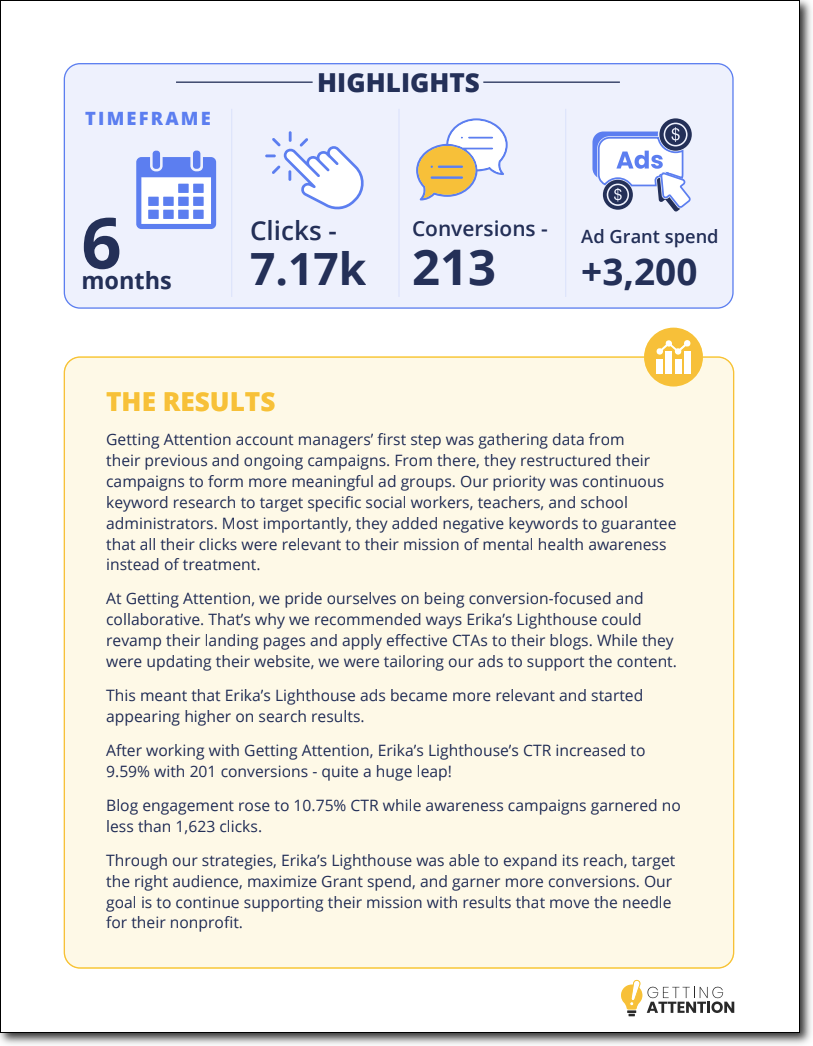
Getting Attention, a Google Ads consultancy for nonprofits, runs weekly webinars to engage growing organizations with practical marketing and Ad Grant strategies. To keep attendance high and reach fresher (and qualified) prospects, they partnered with Nexus for targeted list-building and promotion support.

Each webinar is fully conceptualized and hosted by Getting Attention but promoted to a Nexus-curated segment of nonprofit professionals drawn from our list of contacts. Nexus also supports the creation of promotional emails for the webinars.

With this approach, Getting Attention averages 166 registrants per webinar, with variation depending on topic relevance and partner promotion. Co-hosted sessions or those with highly active partners often see standout spikes in sign-ups.

The impact has been clear:

  • Webinars generate an average attendance rate of 37%.
  • Webinars roughly quintuple the top-of-funnel pipeline.
  • 20% of qualified worked deals in a typical month start with a webinar touchpoint.

Our list-building and promotional support have helped ensure that Getting Attention’s sustained pipeline growth is aligned with real buying intent.

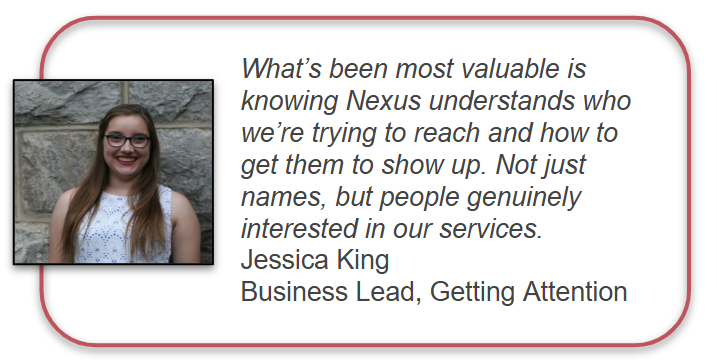
Getting Attention webinar testimonial

Examples of Nexus Webinar Deliverables

To get a sense of what Nexus webinar deliverables look like in action, check out this collection of examples:

Webinar Landing and Registration Page

Example webinar landing and registration page

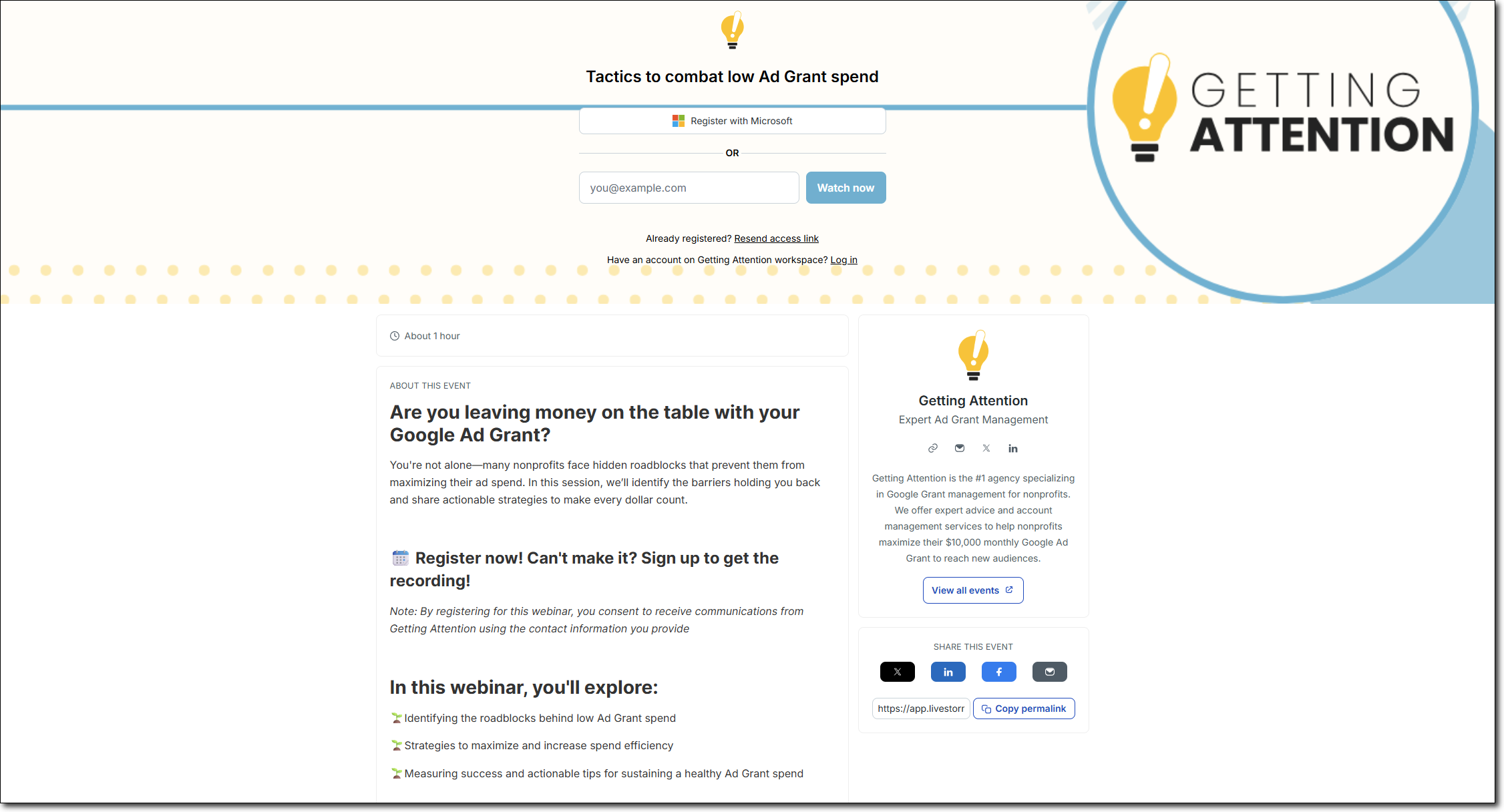
This is the landing page and registration form (now an on-demand download form) for a custom webinar hosted on Livestorm. Visit the live page for a closer look.

Custom Graphics

Example webinar graphic

We’ll create all the custom graphics you need to effectively promote your webinar and make a stellar impression on your event’s registration page.

Promotional Emails

Example webinar email

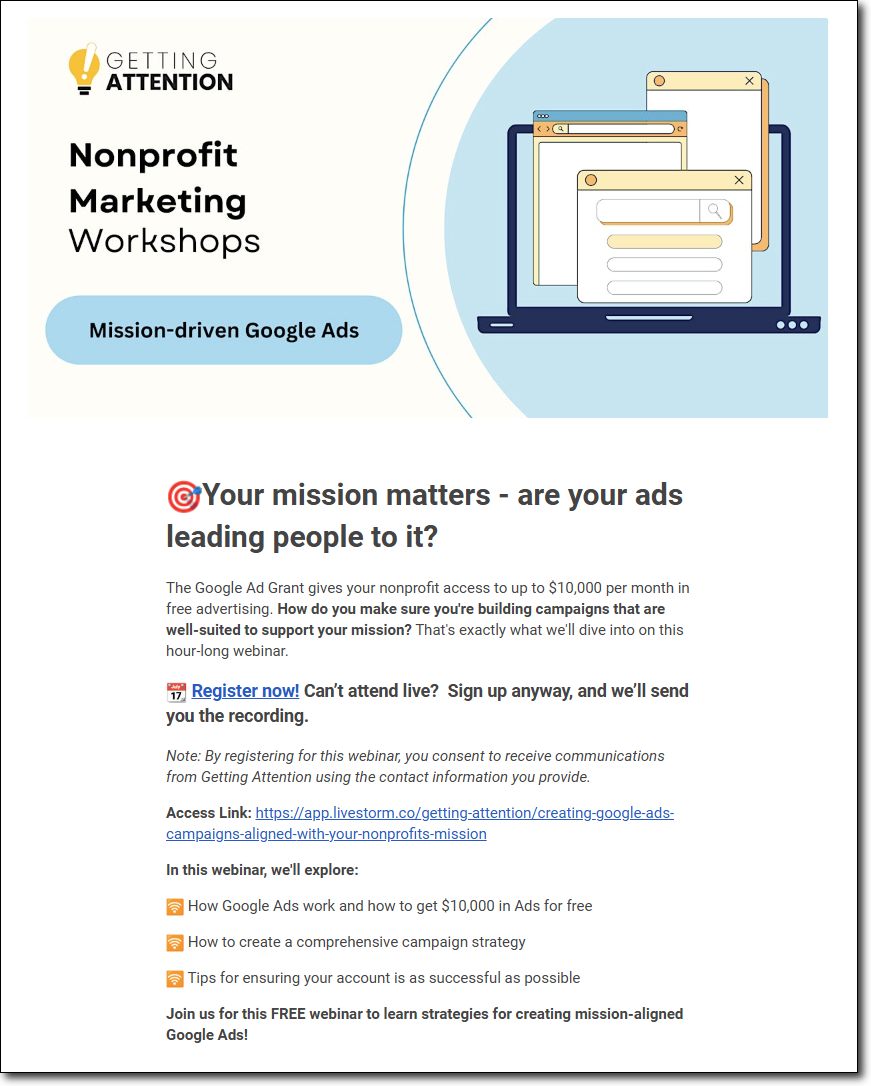
We’ll create a series of 3 promotional emails targeted to your list or ours to encourage registrations for your webinar. During the production process, you’ll have the opportunity to review and provide feedback before we deliver finalized drafts.

Promotional LinkedIn Posts

Example webinar LinkedIn post

We’ll create a series of 3 promotional LinkedIn posts that encourage registrations for your webinar. During the production process, you’ll have the opportunity to review and provide feedback before we deliver finalized drafts.


Partnering with Nexus for Webinar Production & Marketing

Want to integrate webinars into your brand’s lead generation strategy? We can help.

If you’re already a Nexus client, contact your Account Manager to discuss your options for adding webinars to your engagement activities.

The easiest way to make webinar production a sustained lead generation strategy for your brand is to launch a Full-Funnel Demand Program.

These custom packages allow you to curate a tailored sprint of campaign deliverables each quarter, including webinars. We’ll produce them, deliver them to you each month, and work with you to keep improving and updating the strategy along the way. These programs also make it easy to receive extra deliverables that will maximize the value of your webinars.

Specifically, we recommend pairing custom webinar production and marketing with:

  • Follow-up emails. We can use some of your Demand Program’s hours to draft a quick webinar follow-up sequence that starts conversations with your team.
  • Shortform video. Turn your webinar footage into branded clips for easy syndication across channels. Boost your brand awareness and generate more interest for your next event!
  • Downloadable lead capture resources. If you share valuable industry insights and tips during your webinars, try repurposing them into downloadable assets. Quick “Highlights” and “Top Takeaways” PDF resources are an easy way to reach even more leads with your content.

Learn more about Full-Funnel Demand Programs and reach out with any questions. We can answer any questions and get started laying out the perfect strategy for your brand.

Signup for the Nexus newsletter here for more breaking SEO news in your inbox.

The Nexus Approach: Shortform Video Clips

Shortform video clips are everywhere today, and they’re quickly taking off as powerful B2B branding and lead nurture tools.

Our favorite strategy for producing shortform videos is to reuse the valuable video assets already at your disposal—namely, by recycling webinar and digital event footage into packages of easy-to-share clips.

If you’re already putting in the work to host digital events, shortform video is among the easiest ways to boost their long-term value and reach.

Our process makes it easy to turn your event footage into shortform video. Let’s take a closer look at what you can expect.

Signup for the Nexus newsletter here for more breaking SEO news in your inbox.


Quick Background

Shortform video clips are 30 to 45-second branded video snippets optimized for performance on social media platforms and in web content.

Consistently creating and sharing shortform video can support:

  • Brand awareness
  • Your reputation as an up-to-date thought leader
  • The variety and dynamism of your brand’s LinkedIn presence
  • The richness and engagement-power of your web content

Here’s an example clip:

Why Reuse Webinar Footage?

We recommend syndicating your webinar and digital event footage into shortform clips for a few reasons:

  • Efficiency. You’ve already put the time and thought into crafting and hosting your webinars. Recycling the footage saves time and maximizes visibility of your hard work.
  • Engagement. Humans are primed to pay attention and respond to other humans. Videos of real people sharing your talking points are likely to catch more eyes than abstract animations.
  • Social Proof. Putting a real face to your brand can help boost the credibility of your brand. Plus, co-hosted webinars with partners or user-generated content like video customer testimonials can also be easily clipped into shareable shorts.

Deploying Shortform Video

For B2B brands, shortform videos will most commonly be published and hosted on YouTube Shorts and then re-shared on LinkedIn or embedded in web content and emails:

Example LinkedIn video post

Example shortform video embedded in content


Our Process for Creating Shortform Video

When you partner with the Nexus team for shortform videos, what can you expect?

Here’s the production process we follow:

  1. Client: Record webinar screen footage while presenting–we can provide technical guidance to ensure high-quality video capture.
  2. Client: Share the raw event footage with your Nexus team and any specific preferences or timestamps of talking points to grab.
  3. Nexus Video Team: Create branded bumpers to start and end your videos (for first-time video clients)
  4. Nexus Video Team: Use our AI software to automatically identify and clip relevant snippets of your footage, in addition to any that you’ve specifically asked us to clip. Manually review automated clips for quality and adjust as needed.
  5. Nexus Video Team: Produce shortform clips in a finished format, including additional graphic elements, subtitles, and music, and send back to you for review.
  6. Client: Review the bundle of shortform clips and provide any feedback and requested revisions.
  7. Nexus Video Team: Implement revisions to the shortform clips, export finalized video files, and return them to you.
  8. Nexus Copywriter (if applicable): Embed finished videos in relevant pieces of web content as needed.

Standard bundles of shortform videos include 5 clips. Our first videos for clients also require slightly more time to produce branded bumpers and establish an overall visual style.

Subsequent videos will be produced more efficiently once we establish shared stylistic expectations–less than 5 deliverable hours for a quick bundle of shareable, engagement-boosting clips!

Examples of Nexus Shortform Video Content

Check out this collection of example shortform videos that represent the range of styles and approaches we can create for your brand:


Partnering with Nexus for Shortform Video

Want to integrate shortform video into your brand’s content marketing strategy? Already hosting (or plan on hosting) digital events that you want to spread far and wide? We can help.

If you’re already a Nexus client, contact your Account Manager to discuss the ways we can add shortform video to your engagement activities. Temporary engagement expansions can also be developed for any larger-scale projects you might have in mind, like repackaging older webinar footage into clips for wider distribution.

No webinars or events on the calendar soon? We can help with that, too.

Through our lead generation campaign packages, we can plan, promote, manage, and host custom webinars on your behalf. Just bring us the idea and your vision for the webinar. We can market it to your list or ours, and we guarantee at least 100 registrants.

Then, use your custom lead generation package to mix and match from a range of other deliverables, including shortform video. We’ll work with you to develop a quarterly strategy, and then you’ll receive fresh lead capture, lead nurture, and sales enablement assets each month.

Have any questions or ideas for how we can support your brand’s lead generation efforts?

Learn more about our video production services or contact us to learn more.

Signup for the Nexus newsletter here for more breaking SEO news in your inbox.

The Nexus Approach: Downloadable Lead Capture Resources

Providing value to your visitors and prospects will enrich your marketing journeys, encouraging more users to stick with you and become qualified leads.

One of the most effective ways to provide value and relevance to visitors is to strategically use gated content to deepen brand awareness and collect lead information.

Downloadable resources are among the most effective and flexible types of gated content, and we often recommend them to our clients and partners.

So, what’s the Nexus approach to downloadable lead capture resources? Let’s take a look.

Signup for the Nexus newsletter here for more breaking SEO news in your inbox.


Quick Background

Downloadable resources is a general term for PDF content on your website that users can access once they provide their contact information. It’s also commonly referred to as lead capture content.

By actively providing their information in exchange for a resource, users effectively qualify themselves as being interested in your brand’s offerings and expertise. Critically, this process also gives you prospects’ email addresses and consent to contact them, enabling sales outreach.

Lead capture content can take many forms, as we’ll see below. However, whatever types of resources you produce, remember that context is key to effectively using it as a sales enablement tactic.

Understand a user’s intent when requesting a certain resource, and then tailor your later outreach to align with that intent.

For example, a user downloading a middle-funnel educational guide might not be ready for a full sales pitch.

Instead, you might send them an email stream that further explores the topic, presents options for solving their problems, and highlights the most relevant aspects of your value proposition. As they further engage with your messages and become familiar with your brand, they’ll be better primed for a sales pitch.


Our Process for Downloadable Resources

The Nexus team frequently collaborates with clients to produce or improve downloadable resources. Most commonly, we work with clients to produce new PDF content for them from scratch.

The content development process involves these general steps:

  1. Account Manager and Client: Align on the strategy for the PDF deliverable and its purpose
  2. Copywriter: Begin researching and planning the content
  3. Copywriter: Gather additional input from the client and request quick calls as needed to gather subject matter expertise, case study details, etc.
  4. Copywriter: Draft the content and loosely mock up its intended formatting, including ideas and descriptions of graphic elements
  5. Client: Review the draft and provide feedback and edits
  6. Copywriter: Finalize the draft of the content and share with our graphics team
  7. Graphic Designer: Execute the drafted content as a fully designed PDF resource
  8. Client: Review the produced PDF and provide feedback and edits
  9. Copywriter and Graphic Designer: Make final adjustments and deliver finished PDF to the client
  10. Account Manager, Copywriter, and Client: Depending on your needs and tech stack, align on implementation plan and provide guidance for setting up a lead capture landing page for the resource

In some cases, we may help clients refresh their older downloadable resources with updated copy and visuals. This process may involve the same two rounds of client feedback, or just one for updated visuals depending on the scope of the project.

If you’re already a Nexus client, you’ll be familiar with this content production workflow—we use the same general steps to create content for your website, minus the optional step of lead capture implementation.

However, note that a downloadable resource may require more input from you depending on its subject matter and purpose.


Examples of Our Downloadable Lead Capture Resources

Nexus downloadable lead capture resources generally fall into these categories:

  • eBooks
    • Mid-length educational content in PDF form
    • Engage users looking to learn more about specific topics related to your offerings, ideal for top- and mid-funnel buying stages
  • Whitepapers
    • Polished reports that include findings from research and surveys conducted by your organization or partners
    • Highly effective for engaging users at later buying stages or post-purchase to build brand loyalty
  • Case Studies
    • Success stories from your work with clients or customers in a fully-produced PDF format
    • Helpful for enabling sales and conveying social proof to high-intent prospects
  • One-Pagers
    • Short PDF resources that may cover a variety of topics
    • Often used to summarize key tactical information to be shared directly with leads and customers
    • Also ideal for enabling sales and engaged high-intent prospects
  • Quick Resources
    • “Freebie” PDF resources like free templates, infographics, and checklists
    • Most commonly used to attract and qualify top-funnel traffic to your website

Let’s take a closer look at specific examples in each category and how Nexus played a role in their production.

eBooks

Improving the Donor Journey with Matching Gifts

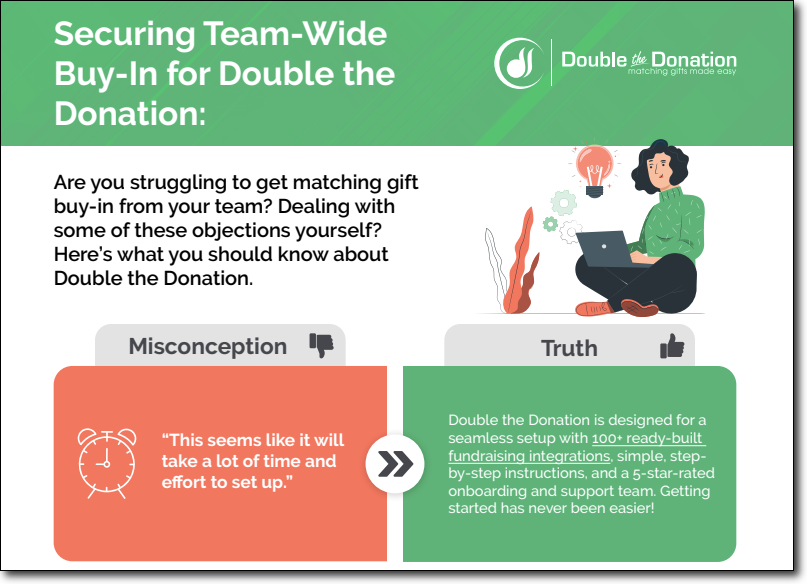
Double the Donation ebook example

  • Strategy: Educational guide for prospects and existing customers. Intended to enrich value proposition of the product. Shareable with customers to ensure adoption and ROI from purchase.
  • Our Role: Full planning, drafting, design, and execution


Introduction to Procuring Quality Charity Auction Items

Winspire ebook

  • Strategy: Visual refresh of an outdated resource. Targeted to a broad audience of users just learning about the subject and looking for guidance.
  • Our Role: Copy updates, visual redesign, and production using updated brand identity

Whitepapers

Key Takeaways from the National Camp Impact Study

Example whitepaper

  • Strategy: A custom branded “top takeaways” resource based on an industry study for use as a lead capture asset and to support sales conversations
  • Our Role: Full planning, drafting, design, and execution

We can also collaborate with you to create longer-form reports based on your organization’s own studies, surveys, and industry projections. Please contact us to discuss your whitepaper needs and ideas.


Case Studies

Downloadable case study library

Uncommon Giving case study resource

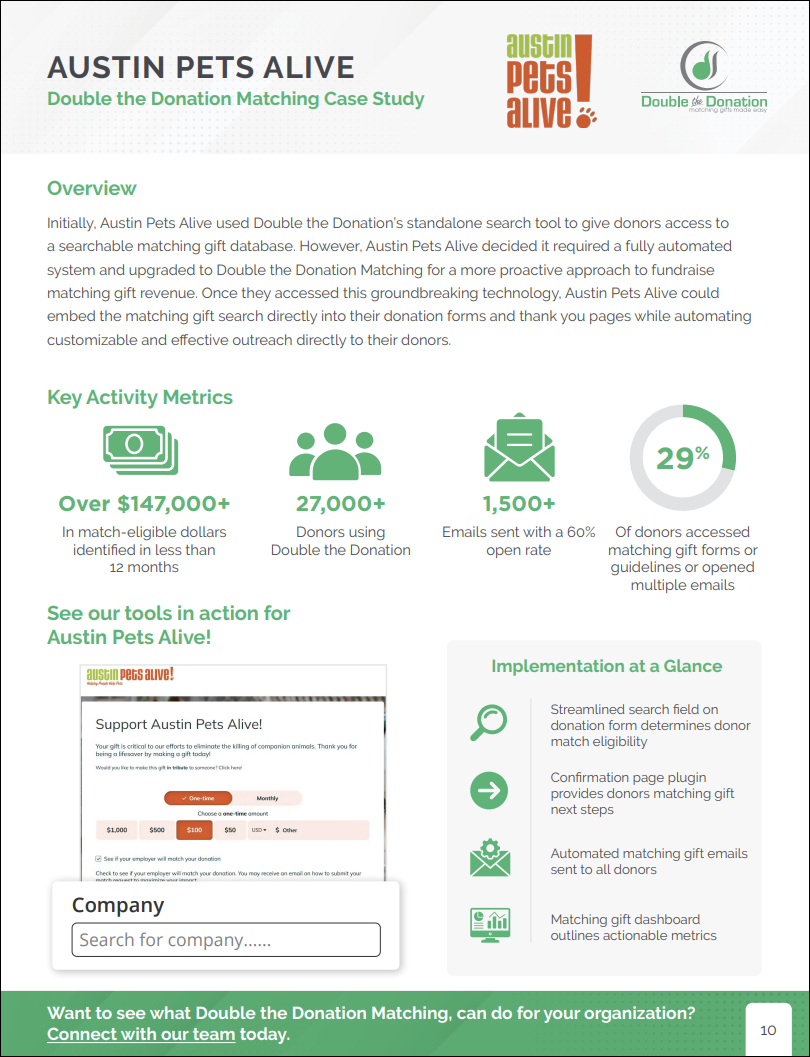
  • Strategy: A downloadable resource that presents all of the brand’s case studies in a single, visually-branded package, used for lead capture and shared directly with prospects
  • Our Role: Drafting, design, configuration as a lead capture funnel in client’s HubSpot instance


Case Study: Claire’s Place Foundation

Getting Attention case study

  • Strategy: Templated case study of client’s work in an easy-to-share format
  • Our Role: Template development, coordinating with client, drafting, design, and execution


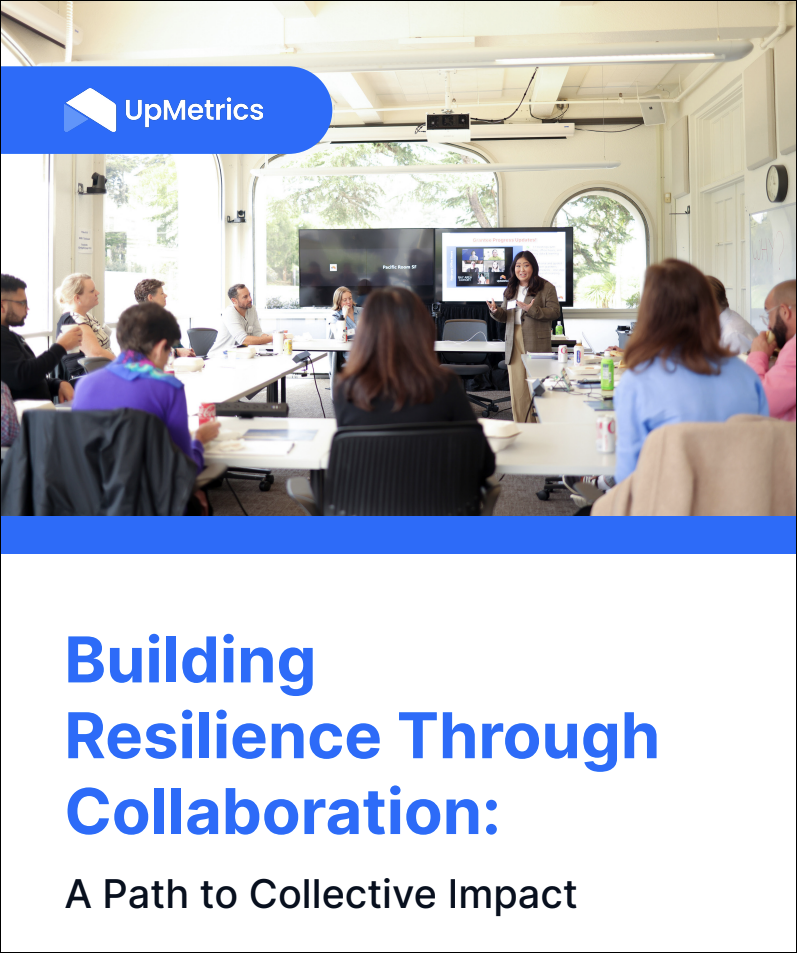
Building Resilience Through Collaboration

UpMetrics case study

  • Strategy: Unique case study-style resource to highlight a client’s unique offering. Intended to educate prospects and demonstrate social proof for the program.
  • Our Role: Full planning, research (including an interview with client’s subject matter expert), drafting, design, and execution


Comprehensive library of matching gift case studies

Double the Donation case study

  • Strategy: Templated case studies compiled into a comprehensive resource for easy access by sales team members when engaging leads
  • Our Role: Template development, coordinating with client, drafting, design, and execution on a rolling basis

One-Pagers

How Are Your Synagogue’s Finances?

Shulware one-pager

  • Strategy: Short resource to educate leads and reinforce value proposition. Used as a both a lead capture resource and shared directly with leads during sales conversations.
  • Our Role: Full planning, drafting, design, and execution


Tradeshow Flyer

Shulware tradeshow flyer

  • Strategy: A double-sided flyer for a tradeshow, to be shared directly with visitors to orient them to the brand and suite of products
  • Our Role: Full planning, drafting, design, and execution (and the initial brand design as part of a larger project!)


Guide to California Department of Education’s ELO-P

CommunityPass one-pager

  • Strategy: Short educational resource on government programs relevant to ICP. Used as a both a lead capture resource and shared directly with leads during sales conversations.
  • Our Role: Full planning, drafting, design, and execution

Quick Resources

Free Corporate Sponsorship Request Templates

Double the Donation templates example

  • Strategy: Free library of templates for a top-funnel audience. Intended to capture and qualify leads from high-traffic pages on the website.
  • Our Role: Full planning, drafting, design, and execution


Google Ad Grant Readiness Checklist

Getting Attention checklist example

  • Strategy: Free checklist resource for a top-funnel audience. Intended to capture and qualify leads from high-traffic pages on the website.
  • Our Role: Full planning, drafting, design, and execution


Pre-Summer Checklist for Camp Directors

Circuitree checklist

  • Strategy: Free checklist resource for a top-funnel audience. Intended to capture and qualify leads from high-traffic pages on the website.
  • Our Role: Full planning, drafting, design, and execution

Partnering with Nexus for Downloadable Resources

Want to integrate downloadable resources into your brand’s content marketing strategy? Or do you have outdated sales or lead nurture materials that need refreshed copy and visuals? We can help.

If you’re already a Nexus client, contact your Account Manager to discuss options for completing one-off PDF projects within your engagement hours. Temporary engagement expansions can also be developed for larger scale projects.

To make resource development a more sustained priority and to build out your website’s content funnel, consider launching a custom lead generation campaign.

These custom offerings allow you to mix and match from a range of lead generation deliverables. We’ll work with you to develop a quarterly strategy, and then you’ll receive fresh lead capture, lead nurture, and sales enablement assets each month.

Have any questions or ideas for how we can support your brand’s lead generation efforts?

Please contact us to learn more.

Signup for the Nexus newsletter here for more breaking SEO news in your inbox.