This year, Claude and OpenAI have begun embedding watermarks on text generated through Claude and ChatGPT respectively. Many are forgetting that Google has actually been watermarking Gemini-generated text since 2024.
The watermark only indicates that content may have been touched, not authored, by AI. The absence of a watermark also does not guarantee that ideas are completely human and original.
Google is not against AI-generated or AI-assisted content. Google is against scaled content abuse that violates its spam policies.
Humans detecting AI slop should be feared more than search engines detecting a watermark.
Marketers can still use AI to generate content. Recommended guidelines are at the end of the article.
Earlier this year, Claude announced that all Claude-processed content will now contain a machine-readable watermark. This October, OpenAI followed suit, though OpenAI limited watermarking to the EU.
The implications seem straightforward: with the watermark, AI-generated content can now be identified and detected, providing transparency. But this news is raising several questions among marketers: Does this impact SEO/GEO? Can I still use AI for content generation? To what extent is the watermark applied, and can I remove it?
This article focuses primarily on AI-generated text vs AI-generated images or video.
Watermark Indicates Likelihood of AI-Generated Content, Not Authorship
The technology is not new. Claude’s text watermark actually uses the same Synth-ID approach of Google DeepMind. The technique makes AI-generated content detectable by applying a mathematical pattern to the randomness of the words used.
Here is a summary of the characteristics of the watermark:
Watermarks in text are embedded. They are not perceptible by humans. Watermarking does not affect the quality of LLM’s text outputs.
The watermark is embedded in any content that LLMs have touched. This includes human-written content edited by LLMs, paraphrased content, and translations, even if the original text is entirely human-written.
OpenAI’s tests show that editing can weaken the presence of the watermark. Heavy paraphrasing or editing is needed to completely remove the watermark.
The nature of the watermark thus implies that when it comes to content quality and originality, the watermark is essentially inconclusive:
Content created from original human thought, then refined and translated with AI, will still contain the watermark.
Content ideated through AI without any human input, then paraphrased heavily with synonyms or manually translated can erase the watermark.
On top of this, both Google and OpenAI have admitted that the watermarking technology has limitations. In fact, OpenAI reports that there is a risk of false positives (detecting the watermark when there is none) for longer pieces of text. False negatives (reporting the watermark’s absence when something is in fact AI-generated) also exist.
Watermarking should not impact your website’s SEO/GEO
Over the years, Google has remained consistent in penalizing low-quality content, regardless of the way it was produced.
Google’s own documentation states that Google’s ranking systems “reward high-quality content, however it is produced.” Furthermore, Google also states that “automation has long been used to generate helpful content…AI has the ability to power new levels of expression and creativity.”
Let’s also not forget that Google itself owns Gemini. It would not make sense for Google to penalize content generated with the assistance of its own technology.
All of these reasons should provide enough assurance to marketers that the way a piece of content is generated is less important than the quality and originality of the published content piece.
What Matters is the Appropriate Use of AI
On the other hand, what Google does penalize is scaled content abuse. This refers to the practice of generating large volumes of content with little to no value, with the aim of manipulating search engine results.
Some examples of this include generating hundreds or thousands of pages in a short period of time with content that is largely reproduced facts, and is largely repetitive. These are pieces of content with no original or human insight.
LLMs make scaled content easier to produce (and abuse), and this is what gets penalized. To quote from Google’s announcement in 2024, the SynthID watermarking technology was developed “to help prevent widespread misuse of AI-generated content.”
If you are not misusing AI, then you have nothing to worry about.
Another Emerging Problem: Humans Can Detect AI Slop
Let’s not forget that humans are becoming increasingly skilled at detecting AI slop. As B2B marketers, we should be more worried about our readers detecting AI slop, than machines or engines detecting a watermark.
With the large volume of AI content saturating our feeds, humans are now able to detect whether a piece of content is AI-generated. Content that is obviously AI-generated with no unique insight is perceived by many as less credible.
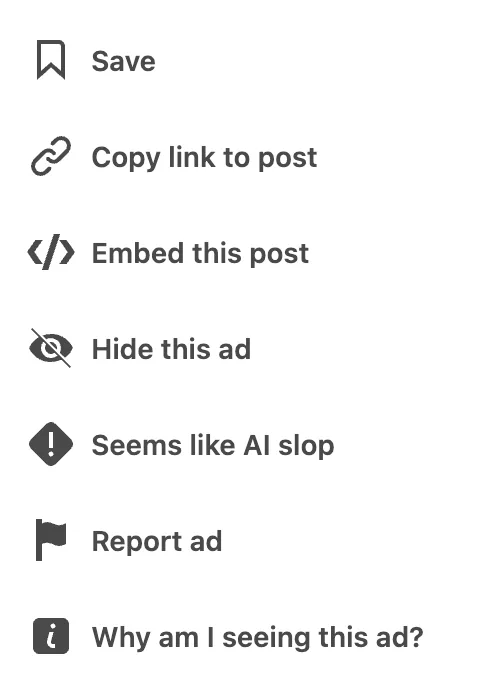
In fact, LinkedIn has even launched a new feature where its readers can report AI slop through the click of a button. This move demonstrates that inappropriate use of AI is increasingly common and prevalent, and that originality and human insight is becoming scarce because of the convenience AI brings.
Our Advice for B2B Marketers Selling to Mission-Driven Clients
AI has made everyone with LLM access a content creator. In fact, it can be argued that AI has actually made content creation more difficult – how do you stand out in this age of AI-assisted content creation?
1. Drill down on human involvement.
The most basic form of human involvement is making sure that all AI-generated content is vetted by a human for accuracy. On Oct 1, Google explicitly added a guideline that states to “manually factcheck and review all AI-generated content for accuracy and trustworthiness before publishing.”
The second layer of human involvement is adding human insight, and making sure that the article delivers real value to your readers. This requires content review from an expert in the field who is well-versed in the topic or possesses unique industry experience.
Without a domain expert reviewing, vetting, and manually enriching content with personal experience and insight, there is no way for your content to stand out from generic AI overviews.
2. Establishing authority is non-negotiable.
In a digital world where everyone can sound like an expert, establishing your credibility and authority also becomes non-negotiable.
This means establishing authority for your website, for your owned offsite channels, and in the eyes of your readers. Building backlinks and having a good amount of social proof on both your website and owned offsite channels are crucial. A strong profile on review sites like G2 and Clutch also become non-negotiable. These offsite channels establish your credibility to AI engines mining through pages to cite in their answers.
Optimizing LinkedIn and ensuring both your company page and the personal LinkedIn profiles of key figures (like your founder) are aligned with what you do, who you are, and who you serve significantly impacts how much your brand stands out.
3. Proprietary research is king.
This builds from #1. The best way to demonstrate your expertise and industry knowledge is by publishing proprietary research. Many brands are unknowingly sitting on a lot of industry data or customer interactions which can be transformed into a report or article.
Publishing proprietary research demonstrates unique expertise, builds authority, and can boost your visibility on AI engines.
Use AI to speed up your research, fact-check every claim, then infuse with your original framing.
We’re here to help you scale
If you feel like there is room for improvement for your brand in these areas, Nexus is more than happy to explore how we can help.
Contact us via this form, or reach out to your Account Manager – we’d love to chat!
https://nexusmarketing.com/wp-content/uploads/2026/10/Main-Banner-2.png4001210Rafi Norberghttps://nexusmarketing.com/wp-content/uploads/2026/03/NX-Logo.pngRafi Norberg2026-10-14 03:47:462026-10-14 03:47:46Claude Watermarking: What it Means for B2B Marketers
AI website builders like Lovable, Bolt, v0, Meno are gaining popularity for their capability to build websites in days instead of months.
AI website builders are great for shipping out MVPs or microsites, but it is risky to rely on them for your brand’s core website.
Websites built using AI are known to have loopholes in security and are prone to data breaches.
AI-built websites are not always built for SEO/AEO, so due diligence and troubleshooting expertise is necessary.
We shouldn’t run away from AI website builders, but the necessary controls should be put in place to minimize the risks.
AI-native website builders like Lovable and Meno are rapidly gaining traction across marketing teams and website developers alike. The value proposition is hard to ignore: what traditionally required a 3-to-6-month development cycle can now be shipped in mere days.
On the surface, it sounds like a dream. So why the hesitation?
These platforms empower non-technical marketers to “vibe code”—describing a site’s functionality in plain English and letting AI architect the codebase. This removes the friction of developer handoffs, accelerates the time-to-market for campaign landing pages, and significantly reduces the overhead associated with custom front-end development.
However, the convenience of AI generation masks significant risks. Many marketers are unaware of the underlying architecture these builders use—and when it comes to brand equity and trust, what you don’t know can be your biggest liability.
AI Means Unmatched Speed
The operational benefits of AI website builders are undeniable. In our company, we use AI-native builders for building microsites and sub-product pages. Frankly, the design quality outpaces what most mid-level developers can ship in a month.
Some advantages we have experienced:
It unblocks our ability to move quickly and ship new pages fast.
We can create a new website in a day versus three months.
We can throw up new product pages basically instantly.
AI-built webpages look decent!
You don’t need tech talent to get to a v1.
The case for AI website builders is clear when producing MVPs and building microsites.
What about bigger sites like our core brand website?
The Trap: Your AI Site Might Be “Invisible”
The primary risk with AI-native builders lies in a technical concept many marketers may overlook: the difference between Server-rendered (Static) HTML and Client-side rendering (CSR).
Traditional platforms like WordPress or Webflow use the Server-rendered (Static) HTML model, which means that they serve a complete HTML document – headings, body copy, links, schema – already in place. When a crawler arrives, it gets everything in one request.
On the other hand, many AI-native builders like Lovable, Bolt, and v0 often default to Client-side rendering:they generate React single-page applications. This means the server sends an “empty shell” of HTML, and JavaScript (JS) runs in the visitor’s browser to build the page.
For a human visitor, this is fine. For a crawler, your site’s content may be invisible.
Crawler Comparison: The Invisibility Gap
Crawler
How It Handles JavaScript (JS)
Impact on Visibility
GoogleBot
Executes JS and can read the page
Generally safe for visibility on AI Overviews and AI Mode
GPTBot, ClaudeBot, PerplexityBot
Do not typically execute JS or wait for rendering.
Invisible. The bot sees an empty shell and leaves.
If your site’s content isn’t visible to crawlers, then your brand will not be recommended in AI Search.
Not all AI builders are created equal
Here’s the caveat: some AI website builders do NOT limit you to client-rendered configurations. That means that your AI-built site’s contents may be read by crawlers. However, it may still require some technical knowledge to ensure the right configuration.
For example, Framer uses AI for design but ships static HTML by default. 10Web uses AI generation on a WordPress backend. These are “safer” for SEO and AI Visibility.
Lovable has the option of doing static generation (not CSR), and recently introduced SEO updates to address search and visibility issues. But the burden of configuration still rests on the builder. If you don’t know to flip the switch, your site remains a ghost.
Bottomline, the responsibility of due diligence is on the marketer. Using an AI website builder requires that you understand the exact mechanism an AI website builder uses, and its implications on crawlability.
The One-Minute Diagnostic: The “View Source” Test
You can test your own site’s AI visibility right now (especially if you built it using AI-native builders).
Load your website.
Right-click and select “View Page Source.”
Hit Ctrl+F (or Cmd+F) and search for a sentence of your actual website copy.
The Verdict: If your text isn’t there, your current website is invisible to search. If the text only exists after JavaScript runs, most LLMs cannot “see” your website content.
AI-Built Websites are Vulnerable to Breaches
In April 2026, the $6.6 billion “vibe coding” platform Lovable suffered a massive breach. With a free account and just five API calls, anyone could access the source code, database credentials, customer data, and AI chat histories of other Lovable users.
This incident exposes a critical flaw in relying solely on AI to build websites: Large Language Models (LLMs) typically optimize for functionality alone, not security and permissions. AI generators routinely fail to establish basic security boundaries, often fetching data by user ID without verifying if the user actually has permission to view it. Because of this, database credentials and sensitive business logic were left fully exposed and visible.
Another concrete example of potential consequences: one EdTech app hosted on Lovable’s Discover page had vulnerabilities which led to the exposure of over 18,000 user records, more than 4,000 of which were of students.
Shipping AI-generated code to production without qualified human oversight is a ticking time bomb. When security protocols are overlooked in favor of rapid generation, the risks offset the benefits for your business.
Our Verdict on AI Website Builders for B2B Brands Selling to Mission-Driven Buyers
My advice to marketers considering using AI website builders:
AI builders are a small but growing segment of the Mission-Driven B2B CMS market. Of the 200+ B2B websites we reviewed, only a handful had transitioned to a native AI build.
It’s clear that the AI builders have advantages around speed, easy design, and quick iteration. We’ve used them for multiple small projects when we need to get something live quickly.
AI website builders are a reasonable bet for a business only if it has the right team in place. I would recommend that any business who chooses to go this route should have experts who can troubleshoot issues if they come up.
You should have a technical person or developer who can verify any AI-generated code before shipping it out to a website.
You should have experts who can verify and troubleshoot for crawlability and other SEO-related issues. (This is where Nexus can help!)
If your team is highly non-technical, I would recommend against doing this. It will be easy to get something live quickly, but troubleshooting will be brutal for any existing business.
Google is still known to discriminate against content that is heavily AI-generated, so relying too much on AI-generated assets may penalize you in the long run. (In fact, Google published a recent paper discussing methods to catch spammers who are using generative AI to flood Google’s platform.)
For B2B brands selling into the mission-driven sector, trust is a non-negotiable asset. Reliability is compromised when your website suffers technical failures that your team cannot resolve – all because the underlying infrastructure was fully delegated to an AI without expert oversight.
Furthermore, a security breach can cause irreparable damage to your brand equity. Given the extended sales cycles typical in nonprofits, healthcare, and education, rebuilding lost trust is difficult and expensive.
We’re here to help you scale
If you feel like there is room for improvement for your brand in these areas, Nexus is more than happy to explore how we can help.
Contact us via this form, or reach out to your Account Manager – we’d love to chat!
https://nexusmarketing.com/wp-content/uploads/2026/07/Main-Banner.png4001210Rafi Norberghttps://nexusmarketing.com/wp-content/uploads/2026/03/NX-Logo.pngRafi Norberg2026-07-20 19:25:182026-08-18 12:33:38AI Website Builders: Should I Use It for My Brand?
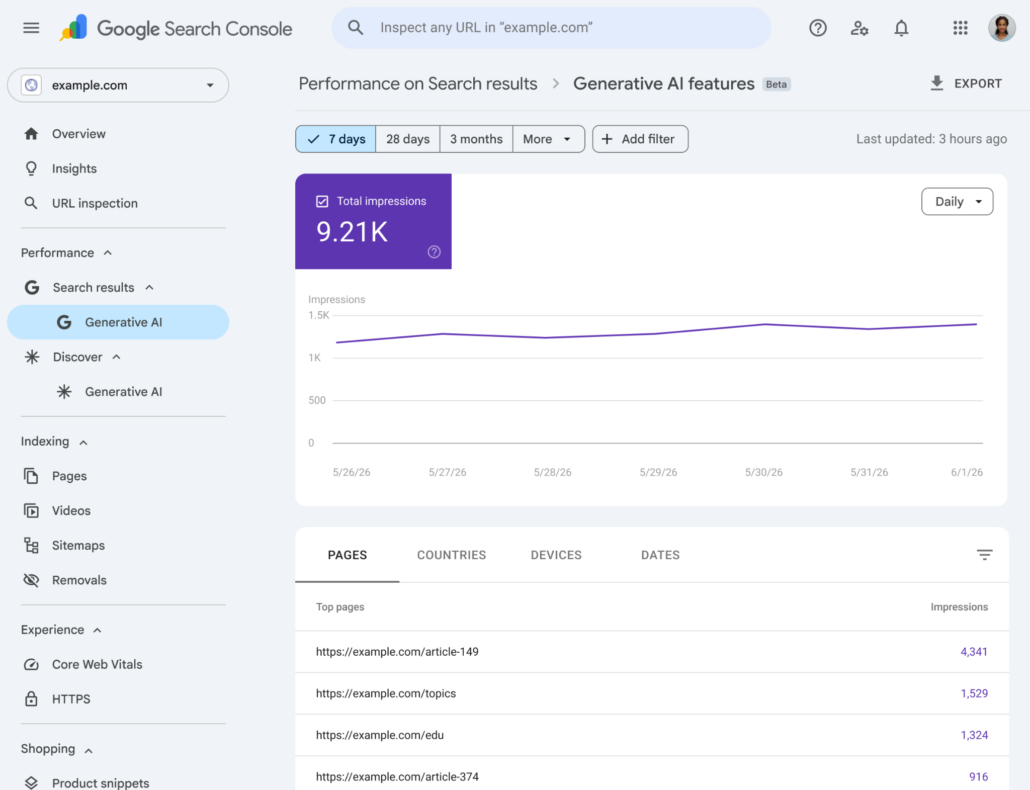
Google has officially launched its new Search Generative AI performance reports. With this new module available in Google Search Console, we can get better insights into your brand’s AI Visibility on Google’s AI Mode and AI Overviews.
Although this module has only been partially rolled out, this is an exciting development since such reports were only previously available on Bing for Microsoft Copilot and Bing’s AI-generated summaries.
So how does Google’s new report impact your AI Visibility tracking?
Benefits of Google’s AI Performance Reports
Absolute Impression Data: We get an absolute number of impressions for your website on Google’s AI Overviews and AI Mode, based on first-party data. While we typically measure AI Visibility using specific prompts, relative percentages, and AI visibility scores, this data enables us to cross-reference and determine if our tracked prompts are driving the majority of your impressions. Both absolute and relative metrics are valuable, and combining them provides greater insight.
Granular Page-Level Tracking: We can now view your brand’s impressions on AI Overviews per page across specific timeframes (hourly, daily, weekly, or monthly). This helps us track the effectiveness of content optimizations and identify your “Hero Pages”—the specific pages generating massive, previously invisible AI impressions.
Limitations of Google’s AI Performance Reports
Missing Granular Insights: Google’s AI Performance Report does not break down impressions per prompt, analyze them per keyword cluster, or track link clicks from AI Overviews. Hence, the data provided by Google is still quite limited on its own and is still best supplemented with other tools that we currently use.
Lack of Advanced Metrics: Our current approach offers data that Google’s report cannot provide, including AI Share of Voice, Brand Sentiment on LLM responses, benchmarking against competitors, cross-platform AI visibility (e.g., on platforms like ChatGPT), and AI visibility per tracked prompt. This set of metrics provides a fuller picture of how your brand is being cited by LLMs, the context and conversation surrounding your brand, and how you’re performing relative to competitors. In many ways, these data are more actionable than absolute impression data alone.
Exclusion of Non-Linked Mentions: Unlike our current approach, which counts both URL citations and brand name-drops by LLMs, Google’s report does not count a brand mention as an impression unless it includes a page link. Brand name-drops are also extremely important alongside URL citations, since studies have shown that brands that have been recommended by LLMs typically experience a branded search lift within the next seven days.
In summary, Google’s new Search Console AI performance reports provide accurate, first-party data on your brand’s organic impressions within Google’s AI features, allowing you to quantify your total scale of exposure.
In contrast, Nexus’s AI Visibility reports utilize third-party simulations to track brand mentions and citations across key prompts that matter to your brand, helping you reverse-engineer the “why” and “where” behind your visibility and analyze competitor performance as well. These simulations also allow us to track your brand’s visibility across multiple LLMs, not just Google’s AI Overviews.
By combining Google’s absolute impression data with Nexus’s prompt-based tracking, you gain a more comprehensive view of your AI-driven search presence. Our prompt-based approach offers the granularity needed to build an actionable roadmap for improving your AI visibility, which we can then validate with Google’s absolute impression data.
FEATURE
Google Generative AI Report (Search Console)
Current Nexus Approach
DATA TYPE
First-party server logs (Accurate user data)
Simulated user behavior (Sample-based scraping)
METRICS
Organic Impressions only.
Counts only clickable URL citations as an impression.
Citation Share (% of prompts your URL won), Share of Voice, Brand Sentiment.
Counts both URL citations and brand name-drops or mentions.
QUERY AND PROMPT DATA
Not available
Granular AI visibility tracking per prompt
COMPETITOR PAGES
No insights
Can track competitor AI Visibility for specific prompts
SCOPE
Google ecosystem only (AI Overviews, AI Mode)
Multi-LLM (ChatGPT, Gemini, etc.)
Important Note
Due to Google’s partial rollout, Google’s AI performance reports are not yet available for all accounts. For Nexus clients with GEO services included in their scope, our team is closely monitoring your Search Console for this rollout. Once this dedicated generative AI view goes live for your site, we will pivot our reporting to include these visibility metrics to provide you with additional insights on your AI Visibility.
We’re here to help you scale
If you feel like there is room for improvement for your brand in these areas, Nexus is more than happy to explore how we can help.
Contact us via this form, or reach out to your Account Manager – we’d love to chat!
https://nexusmarketing.com/wp-content/uploads/2026/06/Main-Banner-1.png4001210Rafi Norberghttps://nexusmarketing.com/wp-content/uploads/2026/03/NX-Logo.pngRafi Norberg2026-07-06 20:27:342026-08-18 12:35:12How Google’s New AI Performance Report Impacts Your AI Visibility Tracking
This May, Google dropped official guidance for the first time in over a year on how they are thinking about rankings within AI search.
For B2B firms selling into nonprofits, healthcare, associations, or education, here’s what you need to know.
Key Takeaways from Google’s Search Update
1. Core SEO strategies still apply for AI search
Google officially affirmed that core SEO strategies are the exact foundation needed for generative AI search. Google officially affirmed that core SEO strategies are the exact foundation needed for generative AI search. The Nexus approach—improving your website’s messaging, optimizing internal linking, and building offsite authority—is your essential foundation for winning visibility in the era of AI search engines.
2. Brand consistency across the web matters
AI Search is built on Retrieval-Augmented Generation (RAG). This means that AI search engines pull core, “grounded” brand information from their index first, and then layer recent updates on top. Your business is now judged by its entire digital footprint across the internet, not just your website. If your footprint is fragmented, AI models get confused and pass you over.
3. Multi-Channel Syndication (YouTube is more important than you think!)
Data shows that brands with active, robust YouTube channels are consistently being prioritized in AI answers. Treating video as a core growth channel is no longer optional.
Unfortunately, roughly 80% of the B2B brands I look at have no real YouTube strategy. If this describes you, you might want to check out our recently published guide that talks about content syndication across YouTube and LinkedIn.
At Nexus, we help clients establish multi-channel presence by syndicating content from an existing anchor asset.
4. Build a Case Study Library
When you’re selling into mission-driven sectors, your edge shows up far better in proof of client outcomes than in another blog post — the nonprofit you helped raise more, the association you helped grow membership, the health or education client whose numbers moved.
5. Authoritative Mentions are Non-Negotiable
AI search tools rely heavily on third-party citations to validate answers, especially in trust-heavy sectors like healthcare or education. Google explicitly warned against spam, favoring organic, contextual mentions. This just reinforces the value we bring by securing high-quality, relevant backlinks for your brand through our Nexus network of 500+ industry partners.
Through our network of partners, we are able to help our clients build offsite authority and boost their AI visibility. You can read more about our partner network here.
Interested to learn more?
I discuss these insights on Google’s recent updates in more depth in my LinkedIn video here.
We’re here to help you scale
If you feel like there is room for improvement for your brand in these areas, Nexus is more than happy to explore how we can help.
Contact us via this form, or reach out to your Account Manager – we’d love to chat!
https://nexusmarketing.com/wp-content/uploads/2026/06/Main-Banner.png4001210Rafi Norberghttps://nexusmarketing.com/wp-content/uploads/2026/03/NX-Logo.pngRafi Norberg2026-06-05 14:26:522026-08-18 12:38:02Google’s New AI Search Rules (And What It Means For You)
The ways that websites collect visitor data is changing fast. The biggest player in the space, Google, has been slowly implementing changes to catch up.
To stay compliant with evolving privacy regulations and to keep drawing reliable insights from your website’s performance (like the ROI of your SEO investments), you need to understand these changes. Specifically, you need to understand Consent Mode and its predictive modeling features in Google Analytics 4.
Here’s a quick guide to third-party cookie deprecation, “cookieless tracking,” and what they mean for your marketing analytics:
Quick disclaimer: We’re not tech or legal experts, we’re digital marketers.
This is our quick summary of changes in the digital privacy landscape and their implications on digital marketing. Please consult with a specialized professional if you have questions about your site’s compliance or backend consent management practices.
(But for questions about digital marketing, SEO, and tracking your lead generation results, we can definitely help.)
Update: July 2024
Since we originally published this guide, Google came out with a pretty huge announcement. The company has reversed course and will not phase out third-party cookies for users on its Chrome web browser.
Instead, Chrome will eventually ask users to choose privacy and cookie preferences that will apply across their entire browsing experiences. Search Engine Journal’s writeup provides a helpful summary.
What does this mean?
First, some of the information below that assumed Chrome would deprecate third-party cookies in 2025 is now inaccurate.
This policy change does not impact your pre-existing compliance requirements.
Your website likely doesn’t use unnecessary third-party cookies to collect user data without consent, but understand that this is still illegal under many laws.
As always, be mindful of the plugins and tools you install on your website and run regular security updates.
Remember, this change applies only to users who visit your website using Chrome. Most other leading browsers have already deprecated third-party cookies.
Since not all of your traffic comes from Chrome users, you’ll still need a working knowledge of the privacy and data modeling features of Google Analytics 4 to effectively interpret your web and SEO analytics.
Consent Mode in GA4 is still mandatory, and you likely already have it turned on (but you should still double-check).
This change will more heavily impact your online advertising strategies—stay tuned into developments in the space so that you can readjust your data collection strategies if needed.
Google always keeps us on our toes!
For the full story, including context about privacy regulations, Consent Mode, and how to turn it on, please keep reading, and let us know if you have any questions!
Quick Context
Here’s the background:
Laws like the GDPR and state-level regulations in the United States require websites to ask for user consent before using any cookies not deemed “necessary.”
It’s not often possible to ask for consent to use third-party cookies, so these are effectively banned (or at least made very difficult to use) under many of these laws.
Google (whose Chrome browser dominates the market) has been relatively slow to adapt but will finally deprecate third-party cookies sometime in 2025.
Consent Mode is now mandatory for all websites that use Google Analytics and/or Google Ads, but you’re likely already in compliance—see our breakdown and instructions below.
Let’s say you understand the laws and your website actively asks for consent to use cookies. Everything seems to be running fine.
So what’s the issue?
There are two key areas where your brand could take a hit as a result of changing cookie practices: first-party data collection and advertising.
Impacts on First-Party Data Collection
Google Analytics uses first-party cookies to track engagement data of visitors on your website. These cookies are not considered “necessary” and thus require consent.
When users decline or ignore consent requests, this results in gaps in your data—potentially huge blank spaces in your digital marketing analytics.
You’ve likely already seen some of these effects as consent collection becomes the norm and as Google Analytics 4 has rolled out new compliance features and tools.
Without reliable data about how users are finding, engaging with, and leaving your website, your marketing strategy will suffer. Understanding user journeys and conversions is critical for improving over time, and this data is essential for measuring the ROI of your marketing strategies like SEO campaigns.
This is why this issue is top of mind for us here at Nexus Marketing. As the web evolves, we want our clients and partners to help lead the charge.
Impacts on Online Advertising
For brands that rely heavily on online advertising, particularly retargeting campaigns, the deprecation of third-party cookies on Google’s Chrome will be a major change.
As they currently work, these campaigns will be practically impossible without third-party cookies.
Many brands are still running late. An Adform survey found that:
65% percent of U.S. respondents reported already seeing a negative impact on their online advertising efforts as a result of third-party cookies being blocked on many browsers.
Nearly 40% are not fully aware of the solutions available to navigate this change.
36% don’t have a clear idea of how third-party cookie deprecation will impact their marketing strategies.
Why It Matters
Cookie deprecation is already underway, and it’ll continue to be a major discussion in the coming months as Google moves ahead with its planned changes. You need a strategy for shifting your advertising and first-party data collection methods now.
Thankfully, Google appears to be on top of it. For advertising, Google has been developing new alternatives to third-party cookies. For data collection, GA4 has introduced new features that help fill data gaps.
As SEO marketers, our main focus is on first-party data collection.
We’ll take a closer look at GA4’s solution, behavioral modeling in Consent Mode, below—jump ahead to check it out.
And if you’ve already implemented Consent Mode, we’ll also discuss warning signs to look for that may indicate data isn’t flowing correctly.
Digital Privacy Regulations & Cookies
Here’s extra context that you may find helpful:
Why do cookies require consent?
Since the adoption of the GDPR and ePrivacy Directive in the EU, third-party cookies have been effectively banned for use on site visits from European visitors. Similar laws from the U.S. and around the world have since been enacted, too.
Even though not all of a site’s users will come from these jurisdictions, the laws are widespread enough today that it’s essentially easier to treat them as universal than it is to spend time and resources completely fine-tuning the site’s backend for different visitors.
Many of the big web players adapted fairly quickly. Web browsers like Safari and Firefox made fast changes to comply with the new norm. Apple has made frequent updates to the privacy features of iOS to stay in compliance, as well.
The effect has been that it’s now difficult for websites to track user behaviors on these browsers and systems for the purpose of retargeting them with ads.
Why has Google been slow to adapt?
Google implemented a solution in GA4 for mitigating the impacts of cookie consent, Consent Mode, back in 2020.
Since 2020, Google has also announced and postponed third-party cookie deprecation several times. The delays now appear to be coming to an end, with the current deadline sometime in 2025.
Why the delays? Google generates a lot of its revenue from advertising tools and services.
Third-party cookie deprecation directly limits their ability to operate, so Google has been working to develop alternative systems that will protect these revenue streams through its ambitious Privacy Sandbox initiative. With the 2025 phaseout period fast approaching, it seems like Google might finally be ready.
What’s the difference between first-party and third-party cookies?
First-party cookies are set by the site currently being visited. They operate for single sessions and then deactivate when a user leaves that website.
Third-party cookies are set by a visited website or embedded element that a user encounters but persist as the user visits other websites, tracking their behavior across the web.
Both types of cookies can serve a variety of purposes. For example, cookies are useful for remembering a user’s preferences. A first-party cookie will log this preference data in discrete events rather than as a longer flow of behaviors across multiple sites, as would a third-party cookie.
The biggest use case of third-party cookies by far is to glean insights from a user’s behavior across the web in order to target them with advertising and tailored content later.
Websites use Consent Management Platforms to ask for user consent, track consent collection, and implement the appropriate (or no) cookies as needed. This tool is essential for relaying users’ consent to Google Analytics.
Are third-party cookies illegal?
No, they’re not. But collecting user data without consent is illegal under the regulations discussed above.
In effect, then, most third-party cookies have been made useless (at least for websites that care about compliance).
Remember, too, that the regulatory landscape is constantly changing.
New, complex legislation spurs changes to the web browsers and systems that the whole world uses every day. These big changes filter down into the smaller tools that websites use to measure their traffic and engagement. As the landscape evolves, we can always expect to encounter broken code, malfunctioning website plugins, and more.
This is one of our key takeaways:
Stay aware and be intentional about what you install on your website and whether it’s working properly.
Here we should note that the term “cookieless tracking” is a bit of a misnomer.
Third-party cookies are being phased out on Google Chrome in 2025. Older methods of tracking web analytics relied on them heavily, so the scope of this change in recent years has been quite significant.
First-party cookies aren’t going anywhere. They’ll still be essential for understanding how users engage with your website, but the constantly changing privacy landscape and platform updates mean that they’ll be used in new and increasingly constrained ways.
In fact, these regulatory changes and the third-party cookie phase-out are what spurred the creation of the newest version of Google’s web analytics platform.
Privacy and Google Analytics 4
The shift from Universal Analytics (UA, the legacy version of the platform) to Google Analytics 4 (the newest version) is now complete. As of July 2024, all historical data stored in Universal Analytics properties is now unavailable.
GA4 is a robust platform. This upgrade from UA to GA4 introduced many up-to-date consent compliance features.
What’s the key difference between UA and GA4?
The core difference between these platforms is how their data models group incoming engagement data.
Universal Analytics used a session-based model that grouped all user actions under discrete visit sessions, and it relied heavily on cookies.
Google Analytics 4 uses an event-based model, more closely tracking each user interaction as separate events. It’s a more user-centric and less cookie-dependent system.
We won’t get too in the weeds, but the key takeaway is that GA4 allows for a much more granular and customizable understanding of how visitors are engaging with your website.
(If you’re curious, this article details the technical differences between the platforms in greater detail.)
Privacy features are integral to GA4.
The event-based structure of GA4 allows it to collect first-party data more seamlessly and in new ways that reduce privacy concerns.
It’s possible to collect user engagement data on GA4 without using third-party cookies or collecting IP addresses. This is done through first-party cookies. When users decline consent requests, these data gaps are filled using GA4’s Consent Mode.
What is Consent Mode?
Consent Mode is a feature that you can enable in your GA4 properties that ensures your tracking mechanisms properly adapt to user preferences. Google describes it as a tool that allows websites to collect data on website conversions while fully respecting users’ consent settings.
When Consent Mode is enabled, you’re then able to turn on a “behavioral modeling” feature that works to fill in the blanks in your analytics data through machine learning.
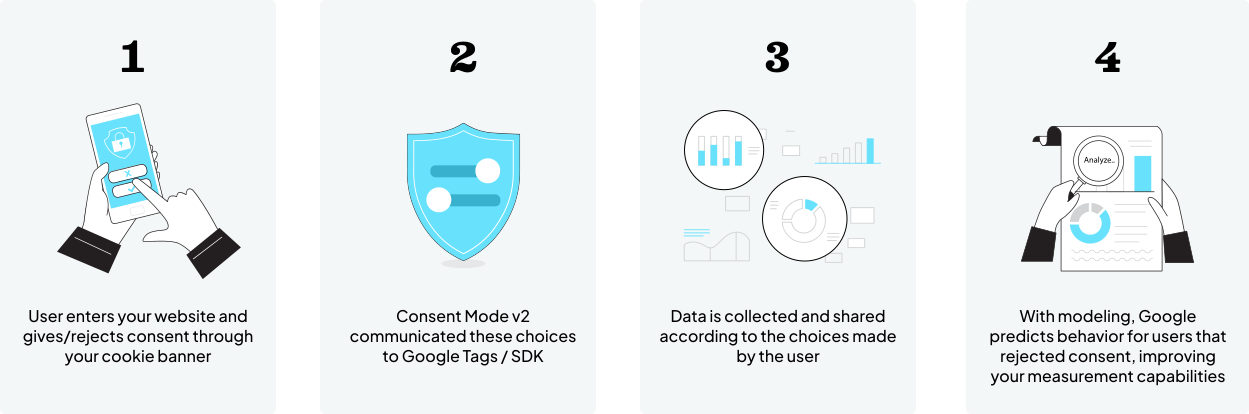
A user provides or rejects cookie consent when they arrive on your site.
Consent Mode communicates the user’s choice to the data collection mechanism installed in the site.
Data is collected and transmitted to GA4 according to the user’s choice. Session start data gathered via first-party cookies from users who rejected consent is completely anonymized and/or highly limited in other ways.
The Consent Mode tool then uses AI-powered predictive modeling to fill in the gaps for users who rejected consent.
This process is driven by machine learning. Although it’s still a relatively new technology and will keep evolving, it’s extremely helpful and gives us something much closer to the full data picture.
Yes. As of March 2024, Consent Mode is now mandatory for all websites that use Google Analytics and/or Google Ads.
Note: Your website most likely already uses a consent management platform (CMP) to run its cookie banners and manage consent settings. If your CMP is Google-certified (most leading providers are), you’re all set. You should already have Consent Mode enabled in your GA4 properties.
If you do not use a CMP and instead have custom-coded consent banners and settings, you must manually enable Consent Mode. We’ll discuss how below.
Without Consent Mode, you risk noncompliance with key European and other regulations. Not enabling Consent Mode will also make collecting data for users in many jurisdictions around the world and/or who reject cookie consent essentially impossible. The data that you would collect would be incomplete and give you a warped view of events, engagement, and conversions on your website.
But by enabling Consent Mode, you’ll stay compliant and be able to use helpful GA4 features that fill in gaps in your analytics.
How to Implement Consent Mode and Behavioral Modeling
Let’s dive into the details about exactly how to ensure these features are enabled in your GA4 properties. First, some important clarification:
Consent Mode ensures your website respects users’ privacy choices.
Consent Mode also allows you to collect enough aggregated, anonymized session data so that Google can predict and model conversions from unattributed sources, called Conversion Modeling.
GA4’s Behavioral Modeling feature works to fill in the rest of the gaps in your web analytics, but there are eligibility requirements your site must meet first.
We’ll take a look at each of these elements below.
Enabling Consent Mode
There are two ways Consent Mode can be enabled on your website depending on how you currently manage user consent preferences.
If you use a Google-certified Consent Management Platform (CMP) to run your cookie consent banners, you should be able to easily turn on Consent Mode within your CMP’s features and options. This will handle the whole technical process of updating the GA4 tags that are triggered by site visits. Now that Consent Mode is mandatory, this setting is most likely already selected in your CMP, but double-check if you’re unsure.
If you use a custom or hard-coded cookie consent banner, you’ll need to make these changes manually.
If you take the manual route, here’s what you’ll need to know:
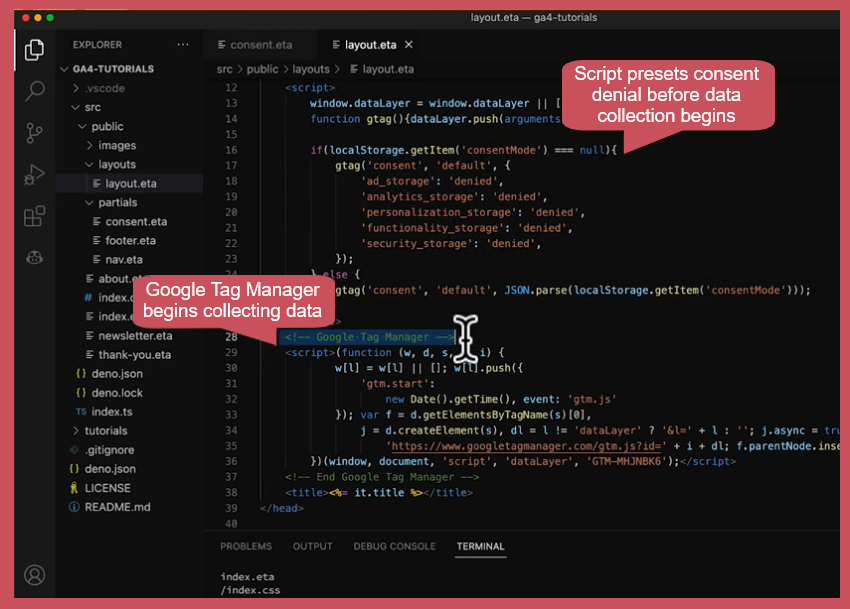
First, you need to establish a default consent state for when users first arrive on your website. The default should be consent denial. Within your site’s code, add a script that establishes these defaults before the main Google Tag Manager script begins.
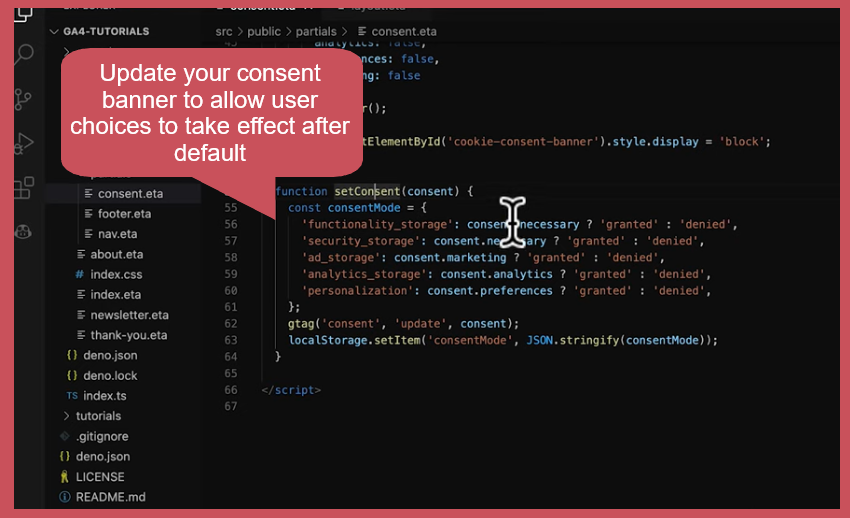
Next, update your hard-coded cookie consent banner to communicate user choices (and effectively override the default settings) by adding a new script:
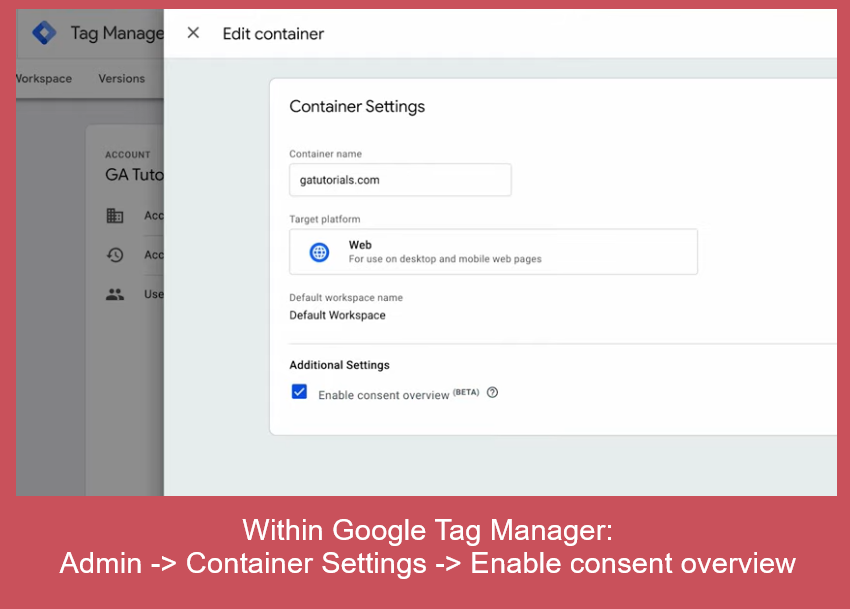
From here, navigate to your Google Tag Manager. You’ll need to enable “Consent Overview” to ensure that GA4 picks up on the changes you’ve made manually and so that you can further customize the consent settings for tags if needed.
Remember: In most cases, websites already use Google-certified Consent Management Platforms and will not need to handle these steps manually. Double-check what tool your website uses if you’re unsure.
If you do already use a CMP, explore its settings or reach out to its support team to confirm that Consent Mode has been activated for your properties.
Understanding Conversion Modeling
When Consent Mode is activated and running smoothly, your GA4 instance should be able to automatically model conversion data to help fill in data gaps.
Why is this necessary?
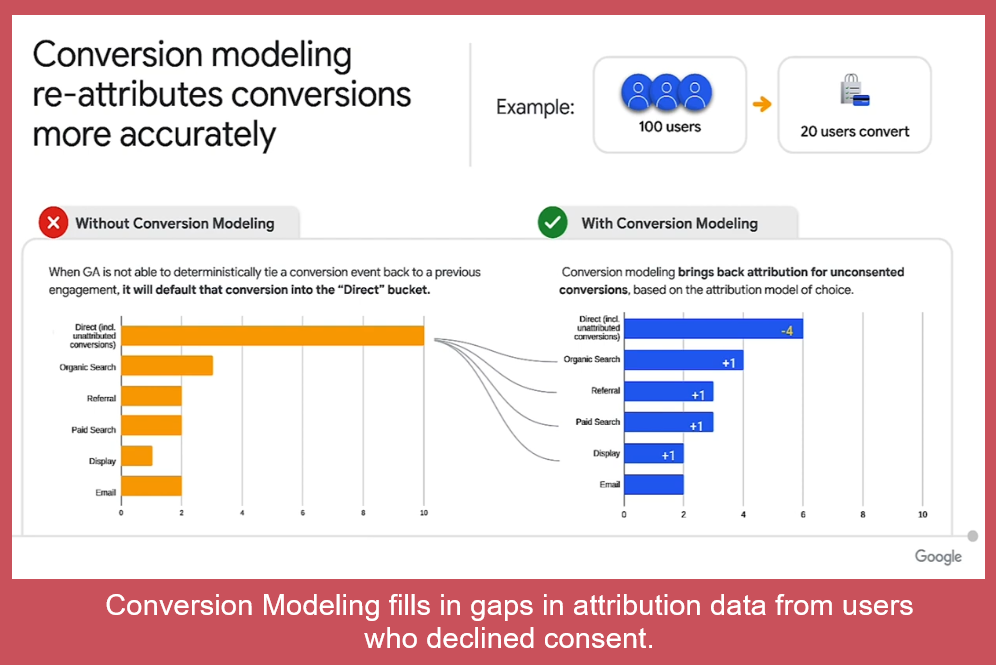
If a user declines consent but ultimately converts on your website (defined in GA4 as triggering a “Key Event”), their initial source will be reported only as “Direct.” They’ll be added to a bucket of unattributed conversions. This isn’t terribly helpful for understanding your website’s marketing performance.
Conversion modeling brings back attribution by mixing machine learning and observable data (either consented or highly limited, anonymized session start data). This diagram explains the value of Conversion Modeling:
In this example, 20 users out of 100 converted. Without conversion modeling, the 10 of those users who declined consent are reported in GA4 as coming from a Direct source. Conversion modeling uses a mix of data to resort those users’ sources more accurately.
For marketers, conversion modeling is arguably the most important of GA4’s new AI- and privacy-related features to understand.
Conversion modeling should also occur in your GA4 properties automatically once Consent Mode is enabled. You don’t need to manually enable it.
However, know that you’ll gain the most useful insights from this feature if your website if your website generates enough conversions to provide Google with enough data to make predictions:
At least 300 conversions per month across the entire website (and for Google ads, 700 ad clicks over 7 days for a domain per country) is a rough rule-of-thumb to ensure full functionality and helpfulness.
For many websites, GA4 offers an additional feature that fills in gaps in your analytics: behavioral modeling.
This feature pulls from observable data and predictive, AI-driven insights to help you estimate the exact events and interactions that occur across your website.
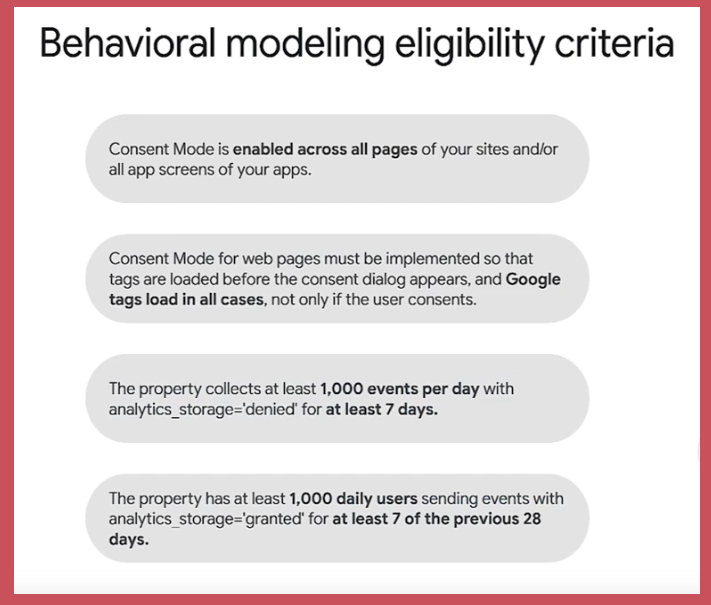
It’s important to note first that not all websites can use behavioral modeling through Consent Mode. Google lays out these eligibility requirements:
Consent Mode is enabled. Again, if you use a CMP, this should already be done.
Consent Mode is implemented so that default consent settings and other tag settings load before the Google tags themselves are triggered. See our explanation of where to code this script and the video overview above to learn more. This step ensures that you won’t begin collecting data until consent is secured.
The website collects at least 1,000 unconsented events per day for at least 7 days. Note that “events” in GA4 can mean many things, but this does require you to receive at least 1,000 visits a week.
The website also has at least 1,000 daily users triggered consented events for at least 7 out of the previous 28 days.
Why does Google set these requirements? For the behavioral modeling system to work correctly, it needs enough data to learn from. Without enough input data from both consented and unconsented users, the system is unable to make meaningful predictions.
If your website meets these requirements, great! We’ll explain below how to ensure behavioral modeling is enabled in your GA4 properties.
If your website does not meet these requirements, don’t worry. Of everything discussed in this guide, Consent Mode and conversion modeling are the most important for 1) ensuring compliance and 2) learning about your big-picture marketing performance. Behavioral modeling provides a more granular look at specific interactions on your website, but unless you have highly robust digital marketing practices, you likely won’t be missing much or any data that you would have previously used.
Remember that conversions are what create ROI for your marketing efforts, not smaller events.
Enabling Behavioral Modeling
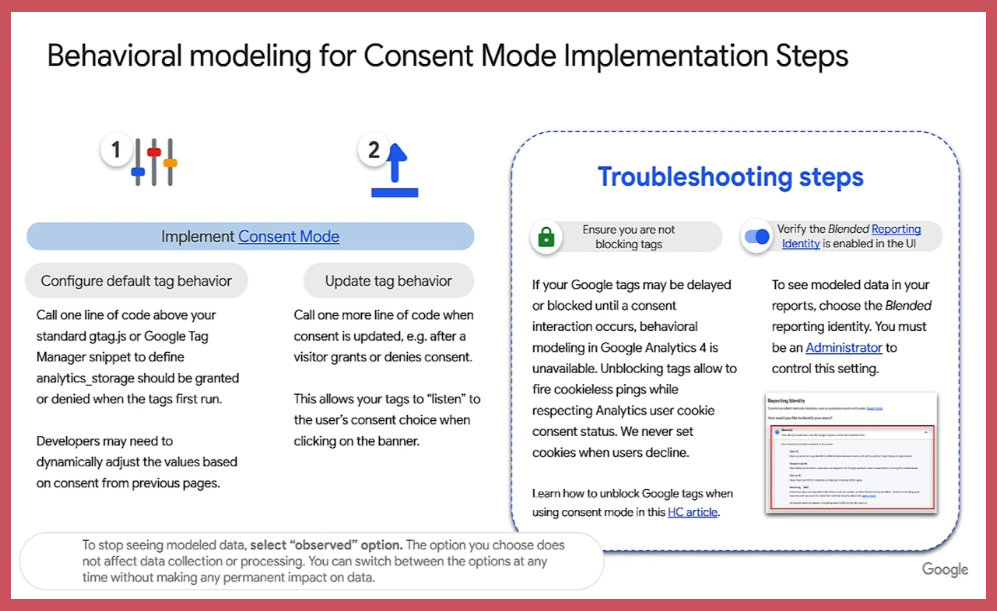
Here’s a quick explanation of the implementation process for behavioral modeling:
Items to note in this explainer:
Default consent tag behaviors must be configured. (See above for our explanation of what this means and how to do it.)
Your website must actively adapt to user preferences and override the default consent setting if needed. (See above for our explanation.)
Your Google tags must be operational and not blocked, even for unconsented users. When Consent Mode is configured correctly, users who do not consent will still trigger cookieless pings (highly limited and/or anonymized session start data). The behavioral modeling system needs this information in order to work properly.
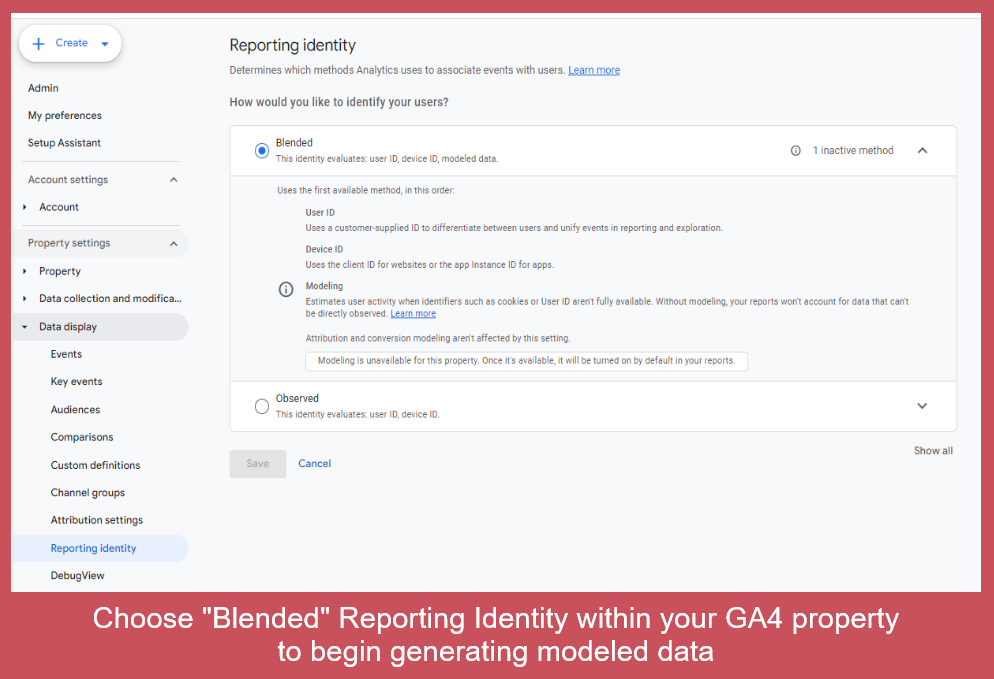
“Blended Reporting Identity” must be selected within your GA4 property’s settings.
That’s it—turning on behavioral modeling is a simple process with only one manual step for most websites. Here’s where to turn on the correct reporting option for that last step:
Setting your property’s reporting identity to “blended” tells Google to activate the behavioral modeling system and begin incorporated predicted data into your analytics reports.
Want a closer look at how GA4’s modeling systems work and how to enable behavioral modeling? Here’s an overview from Google:
Next Steps
Double-check that Consent Mode has been enabled in your GA4 properties.
If you use a consent management platform, this should have already happened.
If you use a custom consent solution, you may need to do this manually.
Enable behavioral modeling for your GA4 properties if eligible.
Do this by choosing “blended” reporting identity in your property’s settings.
Be intentional about the plugins and tools you install on your website.
Stay aware of whether they’re working properly. With the internet privacy landscape changing so rapidly, broken functionalities and potential compliance lapses can happen.
Think about how you can collect more consented, first-party data.
How intentionally have you phrased your cookie consent banner?
How can you better build relationships with customers so that they’ll be willing to provide consent and/or create accounts on your website and become repeat visitors?
Building trust and a reputable brand is increasingly important, and it ties together a lot of what we’re seeing in the SEO world, too.
For Nexus Marketing clients, contact your Account Manager if you have any questions about this guide, your GA4 properties, and whether Consent Mode is activated for them. We can help you check and determine the appropriate next steps.
If You’ve Already Implemented Consent Mode
We mentioned above that broken functionalities are to be expected in the coming months and years. Some websites are already seeing issues with traffic attribution as Google fine-tunes its approach to privacy regulation adherence.
Depending on the mix of tools installed on your site and your GA4 settings, your data reporting not be working properly.
How can you tell? Here are a few signs that something isn’t working:
Sharp changes in one or more traffic channels
Mismatched trends between GA4 and your site’s click performance in Search Console
Unexpected increases in Unassigned or Direct traffic to your website
Disappearing web traffic for all or part of your site, or dramatic unexplained drops in traffic
Now may be the right time to quickly double-check your GA4 properties to look for any strange patterns or traffic drops.
Once they’re identified, the process of troubleshooting and correcting them shouldn’t be too difficult.
Nexus clients: Please contact your Account Manager if you encounter any of these issues or want help double-checking your GA4 properties.
This is a rich (and complicated) topic that won’t be going away anytime soon, so we encourage you to keep learning about third-party cookie deprecation, cookieless tracking, and GA4. Here are a few resources that we’ve found helpful:
https://nexusmarketing.com/wp-content/uploads/2024/06/cookieless-tracking-feature.jpg4231210David Myershttps://nexusmarketing.com/wp-content/uploads/2026/03/NX-Logo.pngDavid Myers2024-06-28 17:31:492026-10-30 14:00:34Cookieless Tracking, Google Analytics 4, and What It All Means for You
In a recent announcement, Google introduced Search Generated Experiences (SGE), a feature that uses Large Language Models (LLM), to provide more detailed search results. This generative AI technology aims to provide more comprehensive, detailed responses to search queries, including conversational prompts.
Google has been leveraging AI in search for years, but with SGE, the search experience will become more conversational and fluid. The company refers to this change as a significant shift in the future of search.
There is A LOT of noise on this topic from the SEO industry and plenty that we don’t know. Since this change hasn’t been rolled out yet, the best source of truth is Google’s expanded brief on the topic of generative AI which we’ve reviewed in detail.
Strategic Insights: Navigating the Future of Search with Nexus
The launch of SGE signifies a transformative shift in the search landscape. We are closely monitoring these developments, and here are some of our insights so far:
Emphasis on Quality Over Quantity:
Key insight: Google’s SGE highlights the importance of high-quality content.
How to apply this: We recommend regular audits of your content to ensure it’s up-to-date and relevant.
Nexus POV: We are doubling down on our focus on creating the only highest quality content that should be able effectively to compete in the new evolving landscape.
In-Depth Content and Comprehensive Answers:
Key insight: SGE is designed to provide comprehensive answers to complex queries.
How to apply this: Consider creating comprehensive guides, FAQ sections, and how-to articles that provide complete answers to user questions.
Nexus POV: Make sure that your pages that rank for the most important keywords in your industry fully address the target user intent by looking at the existing SERPs, speaking with experts at your organization on the subject matter, and going through a “best content” checklist that catches any potential gaps.
Focus on User Experience (UX):
Key insight: AI integration in search increases the need for solid UX design.
How to apply this: Try to focus on making your website mobile-friendly, easy to navigate, and have fast loading times.
Nexus POV: In our engagements, we’ll be placing a greater emphasis on technical ranking factors via a variety of tools (Lighthouse, SEMRush, Moz, and Search Console) to promote an optimal website experience for users and increase positive ranking factors.
Adaptive SEO Strategies:
Key insight: This is a fast-evolving space and SEO practices will continue to evolve with the launch of SGE.
How to apply this: We recommend staying informed about changes in search engine algorithms and adjusting SEO strategies accordingly.
Nexus POV: We’ll continue to keep clients aware of these changes and adjust our engagements accordingly to maximize organic channel performance.
Thought Leadership:
Key insight: SGE’s reliance on high-quality sources and citations means thought leadership and citations by other industry-relevant websites are more important than ever.
How to apply this: Strive to publish content that others in your industry will want to reference, to increase your visibility and reputation. Work with industry partners to promote your thought leadership.
Nexus POV: Leveraging our network of 200+ partners, we’ll continue to work with our clients to position their brand as an industry leader through the creation of original, insightful content and win-win marketing opportunities.
These insights guide our strategic approach as we navigate the evolving search landscape. We believe that understanding and adjusting to these changes is vital for successful digital marketing in the new era of search.
Leveraging Industry Expertise in the Era of SGE
In light of the new SGE update, industry expertise becomes an invaluable asset. Google’s generative AI system, SGE, rewards content that reflects a high level of knowledge and understanding within specific industries. This reinforces the importance of our approach at Nexus – emphasizing the depth of knowledge in our clients’ industries.
By leveraging industry expertise, Nexus aims to help our clients create compelling, authoritative content that aligns with SGE’s emphasis on quality, relevancy, and depth of understanding. As we navigate this transformative period in search, our focus remains on helping our clients maximize their visibility and impact in their respective industries.
This is only the beginning…
Generative AI is evolving, reshaping the landscape of search experiences. At Nexus, we’re dedicated to staying ahead of these advancements, ensuring we’re always ready to adapt our strategies and practices to optimize search performance for our clients and partners.
Understanding this dynamic field is a journey, and we are committed to it. As we progress, we are more than willing to have conversations on this subject, exploring together how these advancements can be leveraged to further your success.
Feel free to reach out to me at any time. You can email me at rafi@nexusmarketing.com, or call me directly at 301-760-8230. Let’s navigate the future of search together.





 (Source: